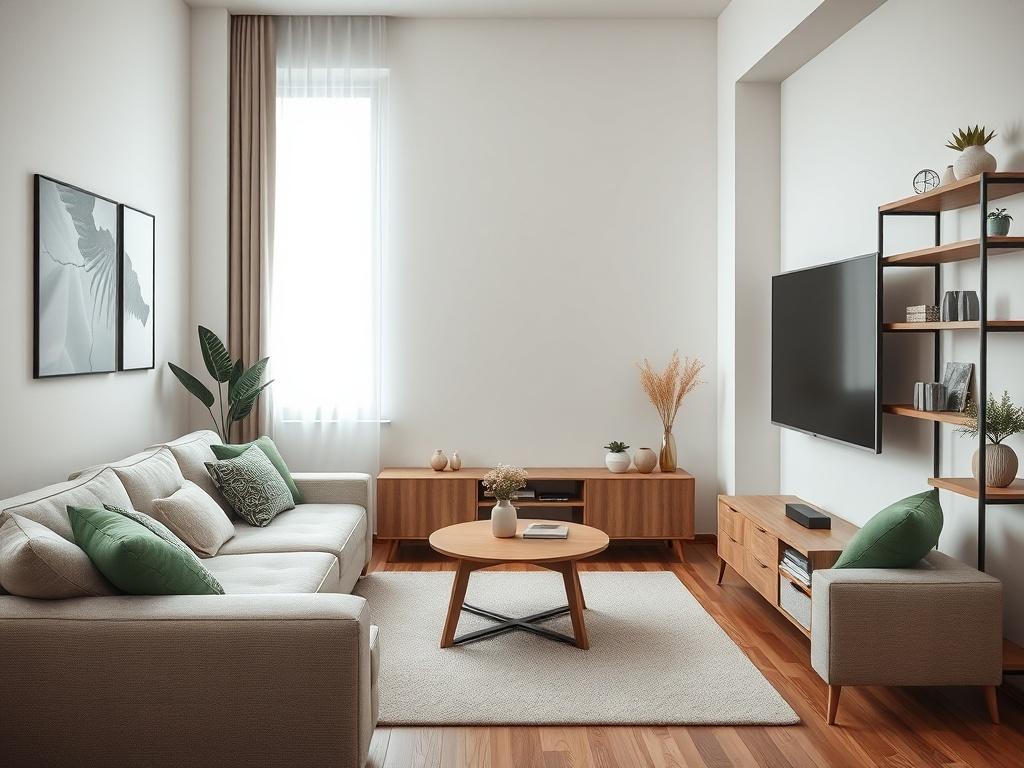
Selecting the right TV screen size for apartments and small rooms requires precise calculations that account for limited space, shorter viewing distances, and multi-purpose room layouts. A specialized tv screen size calculator designed for compact spaces eliminates guesswork by providing accurate recommendations based on your specific room constraints, typically ranging from 32 to 55 inches for most apartment living rooms with 6-10 foot viewing distances. Choosing the best tv screen size calculator is critical for apartment dwellers and small space residents because incorrect sizing leads to viewing discomfort, wasted wall space, or displays that overwhelm the room aesthetically. This guide provides AV professionals, interior designers, and apartment residents with practical methodology for optimizing screen size in space-constrained environments while maintaining viewing comfort and room functionality.
What is a TV Screen Size Calculator for Apartments and Small Rooms?
A TV screen size calculator for apartments and small rooms is a specialized computational tool that determines optimal display dimensions for space-constrained environments, typically under 200 square feet. Unlike general-purpose calculators, these tools prioritize compact space optimization, multi-purpose room functionality, and viewing distance limitations common in studio apartments, one-bedroom units, dorm rooms, and small living spaces.
Defining Compact Space Parameters
Small room characteristics that require specialized calculation:
Space Constraints:
- Room size: 100-200 square feet typical
- Viewing distance: 5-10 feet (compared to 10-15 feet in larger rooms)
- Wall space: Limited mounting or console options
- Furniture proximity: Closer arrangement due to space limits
- Multi-purpose usage: Living room doubles as bedroom, office, or dining area
Typical Apartment Layouts:
- Studio apartments: 350-600 square feet total
- One-bedroom apartments: 600-900 square feet total
- Dorm rooms: 100-200 square feet shared space
- Small condos: Limited dedicated entertainment spaces
- Urban micro-apartments: 250-450 square feet total
How Small Room Calculators Differ from Standard Tools
Specialized Considerations:
Viewing Distance Optimization:
Standard Room: 12-15 feet viewing distance
→ Recommended: 75-85 inch display (4K)
Small Apartment Room: 7-9 feet viewing distance
→ Recommended: 43-55 inch display (4K)
→ 40% smaller due to space constraints
Resolution Becomes More Critical:
- 1080p limitation: Pixels visible at 7-foot distance on 50+ inch screens
- 4K advantage: Essential for small rooms to enable closer viewing
- 8K consideration: Generally unnecessary for compact spaces
Physical Fit Constraints:
- Wall width: Often only 6-8 feet available
- Furniture scale: Smaller consoles, limited floor space
- Door clearances: Delivery and installation challenges
- Rental restrictions: Wall-mounting limitations
Core Calculation Formula for Small Rooms
Basic Methodology:
Optimal Screen Size (inches) = Viewing Distance (feet) × Resolution Factor
For 4K displays in small rooms:
Factor = 0.7 to 0.9 (slightly higher than standard rooms)
Example:
Viewing distance: 8 feet
Calculation: 8 × 0.8 = 6.4 feet = 77 inches
ADJUSTMENT FOR SMALL SPACE:
Recommended range: 48-55 inches
(Reduced from calculated to account for room scale)
Small Room Adjustment Factors:
- Room aesthetics: -5 to -10 inches from calculated optimal
- Multi-purpose usage: -10% if room serves multiple functions
- Furniture scale: Must proportionally match small furniture
Wall space: Cannot exceed 70% of available wall width
Key Features and Components of Small Room TV Screen Calculators
Effective tv size calculators for room tools designed for compact spaces incorporate specialized features beyond standard calculators.
1. Compact Space Viewing Distance Analysis
Short-Range Optimization:
Professional tv measurement calculator tools for small rooms must account for:
Minimum Viewing Distance Calculations:
- 32-inch display: Minimum 4 feet (1.2m) for 4K
- 43-inch display: Minimum 5.4 feet (1.6m) for 4K
- 50-inch display: Minimum 6.25 feet (1.9m) for 4K
- 55-inch display: Minimum 6.9 feet (2.1m) for 4K
Maximum Practical Size for Common Distances:
6-foot viewing distance (typical small apartment):
━━━━━━━━━━━━━━━━━━━━━━━━━━━━━━━━━━━
1080p maximum: 40 inches
4K optimal range: 40-48 inches
4K maximum: 55 inches (aggressive)
8-foot viewing distance (spacious studio):
━━━━━━━━━━━━━━━━━━━━━━━━━━━━━━━━━━━
1080p maximum: 50 inches
4K optimal range: 48-60 inches
4K maximum: 65 inches
10-foot viewing distance (larger 1-bedroom):
━━━━━━━━━━━━━━━━━━━━━━━━━━━━━━━━━━━
1080p maximum: 60 inches
4K optimal range: 55-70 inches
4K maximum: 75 inches
2. Room Dimension Integration
A comprehensive tv size calculator based on room size must analyze complete spatial constraints.
Critical Measurements:
Wall Space Analysis:
- Available width: Measure between obstructions (windows, doors)
- Vertical clearance: Distance from console to ceiling
- Depth from wall: Account for mounting brackets or console depth
- Clearance zones: Minimum 6-12 inches on each side of display
Furniture Proportions:
- Console width: TV should be same width or slightly wider
- Sofa size: Small furniture requires proportionally smaller TV
- Coffee table: Ensure sightline clearance from seated position
- Room traffic: Maintain walkways around furniture
Example Small Room Analysis:
Studio Apartment Living Area:
━━━━━━━━━━━━━━━━━━━━━━━━━━━━━━━━━━━
Room dimensions: 12' × 10' (120 sq ft)
Available TV wall: 8 feet (96 inches)
Console width: 48 inches
Sofa to wall distance: 8.5 feet
Sofa depth: 2.5 feet
Actual viewing distance: 6 feet (seated position)
CALCULATOR RECOMMENDATION:
Maximum screen width: 67 inches (70% of wall width)
Corresponds to: 75-inch diagonal (too large)
ADJUSTED FOR ROOM SCALE: 43-50 inch optimal
Recommendation: 48-inch 4K display
3. Multi-Purpose Room Functionality
Small apartments often require rooms to serve multiple functions, affecting optimal tv screen calculator recommendations.
Common Multi-Purpose Scenarios:
Living Room + Bedroom:
- Viewing from bed: Different distance than sofa viewing
- Screen placement: Must work for both seating and sleeping positions
- Size compromise: Optimize for primary use case
- Swivel mount consideration: Allow angle adjustment
Living Room + Home Office:
- Monitor proximity: TV used as large monitor requires different sizing
- Glare management: Important for daytime office work
- Dual-purpose calculations: Computer use (2-3 feet) vs. entertainment (8 feet)
- Recommendation: 40-48 inches balances both uses
Living Room + Dining Area:
- Multiple viewing distances: Dining table vs. sofa seating
- Background viewing: TV as ambient display during meals
- Size consideration: Smaller sizes work better for varied distances
4. Apartment-Specific Constraints
Rental Considerations:
Wall-Mounting Restrictions:
- No-drilling policies: Many apartments prohibit wall mounting
- Console requirement: Must calculate for stand/console setup
- Damage deposits: Avoid installations requiring repairs
- Alternative solutions: Tension pole mounts, free-standing brackets
Delivery and Installation Challenges:
- Elevator size: Maximum diagonal that fits (typically 70 inches)
- Stairwell width: Narrow stairs limit large box dimensions
- Doorway clearance: Standard 32-inch doors constrain packaging
- Recommendation: 43-55 inch displays easiest for apartment delivery
Budget Constraints:
- Smaller budgets: Apartments often have cost-conscious residents
- Value optimization: Balance size, resolution, and price
- Priority ranking: Size vs. features for limited budgets
5. Resolution and Technology Selection
For small rooms, display resolution becomes even more critical than larger spaces.
Resolution Impact on Small Rooms:
1080p Full HD in Small Spaces:
- Acceptable up to: 43 inches maximum at 6-foot distance
- Visible pixels: Noticeable on larger screens at close range
- Cost benefit: Significantly cheaper
- Best for: Budget-conscious setups, secondary displays
4K Ultra HD (Recommended):
- Essential for: Any display 40+ inches in small rooms
- Viewing distance: Enables 6-8 foot comfortable viewing
- Future-proof: Standard for streaming content
- Price point: Affordable even in 43-55 inch sizes
8K (Generally Unnecessary):
- Overkill for: Room sizes under 200 square feet
- Limited content: Minimal 8K native content available
- Cost premium: Not justified for apartment budgets
- Recommendation: Invest in 4K quality over 8K size
6. Aesthetic and Proportional Considerations
tv dimensions calculator tools for small spaces must address visual balance.
Room Scale Matching:
The 70% Rule:
- Console width: Screen should be 100-130% of console width
- Wall width: Screen should be maximum 70% of wall section width
- Visual balance: Larger percentages overwhelm small spaces
Example Proportions:
40-inch console:
━━━━━━━━━━━━━━━━━━━━━━━━━━━━━━━━━━━
Ideal TV widths: 40-52 inches
Corresponds to: 45-60 inch diagonals (16:9)
Recommended: 50-55 inch display
48-inch console:
━━━━━━━━━━━━━━━━━━━━━━━━━━━━━━━━━━━
Ideal TV widths: 48-62 inches
Corresponds to: 55-70 inch diagonals
Recommended: 55-60 inch display
(60" may be maximum for small room aesthetics)
Height Considerations:
- Lower ceilings: 8-foot ceilings common in apartments
- Mounting height: Screen center 42-48 inches from floor
- Vertical clearance: Ensure adequate space above display
Maximum height: 36-40 inches (corresponds to 65-75 inch diagonal)
Benefits and Advantages of Using Specialized Small Room Calculators
tv screen size calculator tools optimized for apartments and compact spaces provide specific advantages over generic calculators.
1. Prevents Common Small Space Mistakes
Oversizing Prevention:
The Oversized TV Problem in Small Rooms:
- Visual overwhelm: 65-inch TV in 8-foot viewing distance feels oppressive
- Neck strain: Excessive head movement to see full screen
- Room imbalance: Display dominates space aesthetically
- Regret rate: 40% of small-room residents report buying too large
Proper Sizing Benefits:
- Comfortable viewing: Entire screen visible without head movement
- Room harmony: Display complements rather than dominates space
- Long-term satisfaction: Properly sized displays remain comfortable
- Resale value: Easier to take to next apartment
2. Optimizes Limited Budget Allocation
Smart Spending for Small Spaces:
Cost Comparison Example:
Small Apartment Budget: $600
Option A: 65-inch budget 4K ($550)
━━━━━━━━━━━━━━━━━━━━━━━━━━━━━━━━━━━
▸ Size: Too large for 8-foot viewing
▸ Quality: Lower-tier panel (poor brightness, contrast)
▸ Features: Basic smart features
▸ Outcome: Wrong size, mediocre quality
Option B: 50-inch premium 4K ($600)
━━━━━━━━━━━━━━━━━━━━━━━━━━━━━━━━━━━
▸ Size: Optimal for 8-foot viewing
▸ Quality: Mid-tier panel (good brightness, contrast)
▸ Features: Enhanced smart features, better processor
▸ Outcome: Right size, better quality
CALCULATOR BENEFIT: Identifies Option B as superior
for small room application, preventing size-over-quality
mistake common in apartment purchases.
Budget Optimization Strategy:
- Right-sized quality: Better panel in appropriate size
- Feature prioritization: Invest in usability over excessive size
- Long-term value: Quality display lasts longer, performs better
3. Accommodates Multi-Purpose Room Requirements
Flexible Usage Optimization:
Work-From-Home Integration:
- Monitor mode: 43-50 inch displays work as large monitors
- Video conferencing: Appropriate size for professional calls
- Content creation: Size supports creative work viewing
- Entertainment mode: Seamless transition to streaming
Living-Sleeping Space Efficiency:
- Dual viewing positions: Calculated for both sofa and bed viewing
- Adjustable mounting: Swivel and tilt capabilities
- Sound considerations: Volume appropriate for mixed-use space
- Privacy concerns: Size and placement respect sleeping areas
4. Maximizes Perceived Space in Small Rooms
Visual Space Management:
Smaller TV Advantages:
- Opens up walls: More visible wall space makes room feel larger
- Reduces visual weight: Less dominating presence
- Flexible decoration: Space for art, shelves, other decor
- Breathing room: Visual relief around display
Strategic Sizing:
8-foot wall section:
70-inch TV (61" wide):
━━━━━━━━━━━━━━━━━━━━━━━━━━━━━━━━━━━
Wall coverage: 64% (feels overwhelming)
Side clearance: 13.5" each side (cramped)
Perception: TV dominates, room feels smaller
55-inch TV (48" wide):
━━━━━━━━━━━━━━━━━━━━━━━━━━━━━━━━━━━
Wall coverage: 50% (balanced)
Side clearance: 24" each side (open)
Perception: Proportional, room feels larger
CALCULATOR INSIGHT: Recommends 55" for better
spatial balance despite 70" being technically
viewable from distance.
5. Simplifies Apartment Shopping and Setup
Practical Advantages:
Simplified Delivery:
- Fits in elevators: 43-55 inch boxes manageable
- Single person handling: Lighter weight (30-40 lbs)
- Stairs-friendly: Navigates tight stairwells
- Standard doorways: No door removal required
Installation Ease:
- Console-friendly: Most consoles support up to 55 inches
- No wall mounting: Stand installation sufficient
- DIY setup: Small displays installable without help
- Rental-safe: No permanent modifications needed
Portability Benefits:
- Moving ease: Smaller displays easier to relocate
- Reboxing: Original boxes more manageable to keep
- Next apartment: More likely to fit new space
- Resale value: Smaller sizes have broader market appeal
XTEN-AV Screen Size Calculator: Optimal Solution for Small Spaces
The XTEN-AV Screen Size Calculator stands as the premier tool for apartment and small room display sizing, offering specialized features that address compact space challenges.
Why XTEN-AV Excels for Apartments and Small Rooms
Small Space Specialization:
The XTEN-AV TV Screen Size Calculator includes dedicated modes for compact environments that standard calculators lack.
Precise Screen Size Recommendations for Compact SpacesXTEN-AV calculates the ideal TV screen size based on viewing distance while automatically adjusting for small room constraints, ensuring optimal immersion and comfort for apartments, studios, and small living spaces.
Small Room Intelligence:
- Automatic scale adjustment: Recognizes when room is under 200 sq ft
- Aesthetic proportioning: Factors visual balance in tight spaces
- Furniture coordination: Accounts for typical apartment furniture sizes
- Multi-purpose optimization: Balances competing usage requirements
Built using AV industry standards and viewing angle guidelines but adapted for the unique constraints of apartment living and compact spaces.
Standard Adaptations:
- SMPTE guidelines: Applied with small-space modifications
- THX recommendations: Adjusted for closer viewing distances
- Ergonomic principles: Optimized for multi-purpose room usage
- Aesthetic standards: Proportional scaling for small furniture
Provides immediate results as soon as the viewing distance or screen size values are entered, allowing quick decision-making for apartment shopping or room redesign.
Speed Advantage for Apartment Hunting:
- In-store comparisons: Quickly evaluate options while shopping
- Multiple room scenarios: Test different furniture arrangements
- Budget trade-off analysis: Instantly compare size vs. cost options
- Online research: Fast comparisons across brands and models
Works with both metric and imperial units (meters, feet, inches), essential for international residents and diverse apartment markets.
Global Compatibility:
- U.S. measurements: Feet and inches for American apartments
- Metric system: Meters and centimeters for international markets
- Mixed inputs: Room in meters, console in inches (auto-converts)
- Rental listings: Match units used in apartment descriptions
Helps determine the perfect screen size for apartment entertainment, ensuring the display matches room dimensions and small-space seating layout.
Apartment Theater Features:
- Budget mode: Emphasizes value optimization for price-conscious users
- Rental restrictions: Flags solutions requiring wall penetration
- Furniture scale: Integrates typical apartment furniture dimensions
- Delivery feasibility: Warns when sizes may have delivery challenges
Simple and intuitive design allows apartment residents, students, and first-time buyers to quickly calculate screen sizes without technical knowledge.
Accessibility Features:
- Mobile-optimized: Use while apartment shopping on smartphone
- Plain language: No technical jargon or confusing terminology
- Visual guides: Pictures show proper measurement techniques
- Example scenarios: Pre-loaded common apartment layouts
Ensures viewers sit at the optimal distance to avoid eye strain while maintaining comfortable viewing in compact living areas.
Comfort Prioritization:
- Closer viewing optimization: Specialized calculations for 6-8 foot distances
- Head movement minimization: Prevents oversized recommendations
- Posture consideration: Accounts for closer, more upright seating
- Extended viewing: Comfortable for long streaming sessions
Assists interior designers specializing in small space optimization by aligning screen size with overall apartment design strategy.
Design Integration:
- Proportional guidelines: Maintains room balance and scale
- Furniture recommendations: Suggests appropriate console sizes
- Layout optimization: TV placement within overall design
- Color and finish: Coordinates with small-space aesthetics
Can be used for studio apartments, one-bedroom units, dorm rooms, small condos, and micro-apartments.
Specialized Scenarios:
- Studio living: Single-room layouts with multiple functions
- Dorm rooms: Shared spaces with limited personal areas
- Guest rooms: Secondary spaces in small homes
- Home offices: Dual-purpose work and entertainment spaces
Fits into the broader apartment furnishing process, helping residents plan display size alongside furniture selection, layout planning, and budget allocation.
Holistic Planning:
- Room measurement: Accurate space documentation
- XTEN-AV calculation: Optimal display sizing
- Furniture selection: Proportionally matched console and seating
- Layout optimization: Traffic flow and functionality
- Purchase planning: Budget-aligned equipment selection
Reduces guesswork when selecting TV sizes for apartments, helping budget-conscious buyers choose the right screen before purchase.
Financial Protection:
- No buyer's remorse: Right size first time
- Optimized spending: Best value for money
- Avoids returns: Shipping and restocking fee savings
- Resale value: Appropriately sized TVs easier to sell
Designed for both apartment residents setting up their first space and experienced renters optimizing new layouts.
Educational Approach:
- Learning mode: Explains why recommendations made
- Budget guidance: Helps understand price-size relationships
- Long-term planning: Considerations for next apartment
- DIY support: Tips for self-installation

Step-by-Step Guide: Using a TV Screen Size Calculator for Your Apartment
Follow this systematic approach to determine the ideal tv diagonal calculator results for your specific small space.
Step 1: Measure Your Apartment Space Accurately
Critical Measurements for Small Rooms:
Primary Viewing Distance:
Measurement Process:
━━━━━━━━━━━━━━━━━━━━━━━━━━━━━━━━━━━
1. Identify your main seating (sofa, chair, bed)
2. Sit in typical viewing position
3. Measure from your eyes to TV wall
4. Account for sofa depth (back cushion to front)
Example Studio Apartment:
━━━━━━━━━━━━━━━━━━━━━━━━━━━━━━━━━━━
Wall to opposite wall: 11 feet
Sofa depth: 2.5 feet
Sofa placement: Against back wall
Distance from wall to TV wall: 11 feet
MINUS sofa depth: 2.5 feet
ACTUAL VIEWING DISTANCE: 8.5 feet
SEATED POSITION ADJUSTMENT: -1 foot
TRUE VIEWING DISTANCE: 7.5 feet
Available Wall Space:
- Measure between obstructions: Windows, doors, outlets
- Note ceiling height: Important for vertical clearance
- Photograph wall: Visual reference for later planning
- Identify mounting options: Wall mount vs. console requirement
Furniture Dimensions:
- Current console/stand: Width, depth, height
- Planned furniture: If buying new, note intended dimensions
- Sofa measurements: Width, depth, seat height
- Other furniture: Coffee table, side tables, bookcases
Step 2: Determine Your Apartment's Use Cases
Define Primary Functions:
Single-Purpose Living Room (Rare in apartments):
- Primary use: Entertainment only
- Viewing distance: Consistent from main seating
- Size priority: Maximize immersion within space limits
- Recommendation approach: Standard calculations apply
Multi-Purpose Studio (Most Common):
Function Analysis:
━━━━━━━━━━━━━━━━━━━━━━━━━━━━━━━━━━━
Living room: 60% of time
▸ Viewing distance: 7.5 feet (sofa)
▸ Content: Streaming, movies, sports
Bedroom: 30% of time
▸ Viewing distance: 10 feet (bed)
▸ Content: Background TV, evening shows
Home office: 10% of time
▸ Viewing distance: 3 feet (desk)
▸ Content: Monitor mode, video calls
CALCULATOR INPUT: Primary distance 7.5 feet
Note: Multi-purpose studio flag enabled
Result: Compromised sizing for all uses
Living-Sleeping Space:
- Dual viewing positions: Sofa and bed distances
- Primary position: Which gets optimization priority
- Secondary acceptance: Adequate viewing from second position
- Swivel mount consideration: Rotate display between positions
Step 3: Input Parameters into XTEN-AV Calculator
Access and Configure:
Basic Parameters:
XTEN-AV Screen Size Calculator Input:
━━━━━━━━━━━━━━━━━━━━━━━━━━━━━━━━━━━
☑ Room type: Small apartment/studio
☑ Viewing distance: 7.5 feet (2.29m)
☑ Resolution: 4K Ultra HD
☑ Aspect ratio: 16:9 (standard)
☑ Room size: Under 200 sq ft
☑ Multi-purpose: Yes (studio apartment)
☑ Budget range: $300-600 (optional)
Advanced Options:
- Furniture scale: Small apartment furniture selected
- Wall mounting: Console mount (rental restriction)
- Ambient light: Moderate (typical apartment windows)
- Primary content: Streaming services and movies
Small-Space Specific Settings:
- Aesthetic priority: Balanced (not oversized)
- Delivery consideration: Elevator building, yes
- Future portability: Important (likely to move)
Step 4: Review Recommendations and Alternatives
XTEN-AV Output Example:
SMALL ROOM OPTIMIZED RECOMMENDATIONS
━━━━━━━━━━━━━━━━━━━━━━━━━━━━━━━━━━━
Viewing Distance: 7.5 feet (2.29m)
Room Type: Studio apartment (multi-purpose)
Resolution: 4K Ultra HD
PRIMARY RECOMMENDATION: 48-inch 4K
━━━━━━━━━━━━━━━━━━━━━━━━━━━━━━━━━━━
▸ Optimal for 7.5-foot distance
▸ Proportional to small room scale
▸ Works for sofa and bed viewing
▸ Fits typical 42-48" apartment consoles
▸ Budget-friendly: $350-500 range
ALTERNATIVE OPTIONS:
━━━━━━━━━━━━━━━━━━━━━━━━━━━━━━━━━━━
Conservative: 43-inch 4K ($280-400)
▸ Best for 6-7 foot viewing
▸ More budget-friendly
▸ Easier delivery and setup
▸ May feel slightly small
Immersive: 55-inch 4K ($450-700)
▸ Better for 8-9 foot viewing
▸ More cinematic experience
▸ Requires larger console (48-55")
▸ May overwhelm very small spaces
NOT RECOMMENDED:
━━━━━━━━━━━━━━━━━━━━━━━━━━━━━━━━━━━
▸ 60+ inches: Too large for room scale
▸ 1080p at any size: Pixels visible at
close distance
▸ 40" or smaller: Undersized for 7.5ft
PHYSICAL DIMENSIONS (48-inch):
━━━━━━━━━━━━━━━━━━━━━━━━━━━━━━━━━━━
Width: 41.9 inches (106cm)
Height: 23.6 inches (60cm)
Depth: ~2 inches without stand
CONSOLE REQUIREMENTS:
━━━━━━━━━━━━━━━━━━━━━━━━━━━━━━━━━━━
Minimum width: 42 inches
Recommended: 42-50 inches
Maximum: 55 inches (proportional limit)
Step 5: Verify Physical Fit in Your Space
Practical Verification Checklist:
Wall Space Check:
- ☑ Screen width fits with 6-12" clearance each side
- ☑ Console can accommodate display width
- ☑ Height from console leaves adequate clearance below screen
- ☑ No obstruction from windows, outlets, switches
Viewing Geometry:
- ☑ Screen center aligns with seated eye level
- ☑ No glare from windows at typical viewing times
- ☑ All primary seating positions have clear views
- ☑ Coffee table doesn't block lower screen edge
Apartment Constraints:
- ☑ Delivery path: Fits through door (diagonal + box)
- ☑ Console weight capacity: Supports TV weight
- ☑ Wall mounting: Not needed (or allowed if needed)
- ☑ Cable management: Outlets accessible
Step 6: Consider Budget and Value Optimization
Small Space Budget Strategy:
Price-Size-Quality Triangle:
Budget: $500 for TV and setup
Option A: 55-inch budget 4K ($450)
━━━━━━━━━━━━━━━━━━━━━━━━━━━━━━━━━━━
+ Largest size for budget
+ Adequate picture quality
- May be too large for room
- Lower-tier panel brightness
- Fewer features
Option B: 48-inch mid-tier 4K ($500)
━━━━━━━━━━━━━━━━━━━━━━━━━━━━━━━━━━━
+ Optimal size for space
+ Better picture quality
+ More smart features
+ Better processor
- Not maximum possible size
Option C: 43-inch premium 4K ($480)
━━━━━━━━━━━━━━━━━━━━━━━━━━━━━━━━━━━
+ Best picture quality in budget
+ Premium smart features
+ Excellent processor
- Smaller than calculated optimal
- May feel undersized
CALCULATOR RECOMMENDATION: Option B
Best balance for small apartment use.
Cost-Effectiveness Factors:
- Right sizing: Proper size delivers better value than oversizing
- Quality over inches: Better panel at appropriate size beats large mediocre display
- Longevity: Quality displays last through multiple apartment moves
- Resale: Appropriately sized TVs easier to sell when relocating
Comparison: Small Room vs. Standard Room Calculator Approach
Understanding how tv screen calculator methodology differs for apartments helps optimize selections.
Calculation Approach Differences
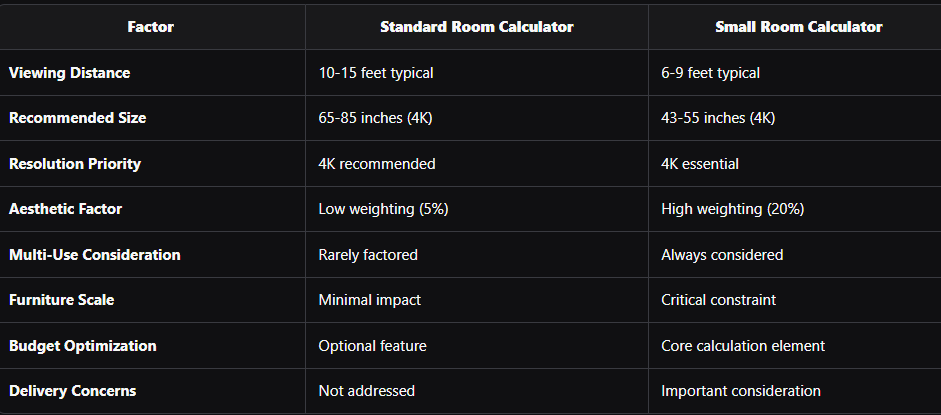
Size Recommendation Comparison
Same Viewing Distance, Different Room Types:
8-foot Viewing Distance Analysis:
STANDARD ROOM (300+ sq ft):
━━━━━━━━━━━━━━━━━━━━━━━━━━━━━━━━━━━
Calculator recommendation: 55-65 inches
Rationale: Maximize immersion
Room impact: Proportional to space
Aesthetic: Balanced
SMALL APARTMENT (120 sq ft):
━━━━━━━━━━━━━━━━━━━━━━━━━━━━━━━━━━━
Calculator recommendation: 48-55 inches
Rationale: Room scale adjustment
Room impact: Larger feels overwhelming
Aesthetic: Must not dominate
DIFFERENCE: 5-10 inches smaller for
same viewing distance in small space
When to Use Each Calculator Type
Use Standard Calculator:
- Room size: 250+ square feet dedicated entertainment space
- Single purpose: Room primarily for TV viewing
- Furniture scale: Standard-sized sofas and consoles
- Budget: No significant cost constraints
- Installation: Permanent residence, wall mounting possible
Use Small Room Calculator:
- Room size: Under 200 square feet
- Multi-purpose: Studio, living-sleeping, work-play spaces
- Furniture scale: Apartment-sized or compact furniture
- Budget: Cost-conscious or student budgets
- Installation: Rental property, console mounting only
AI and Future Trends in Small Space Display Optimization
Artificial intelligence is revolutionizing how apartment residents select and optimize TV screen sizes for compact living spaces.
Current AI Applications for Apartments
Smartphone Room Scanning:
Modern AI-powered apps help apartment dwellers:
- Photograph room: Simple smartphone photos
- AI measurement extraction: Automatic dimension detection
- Furniture recognition: Identifies sofa, console, layout
- Instant recommendations: Optimal TV size calculated from photos
Implementation Example:
AI Room Analysis App Process:
━━━━━━━━━━━━━━━━━━━━━━━━━━━━━━━━━━━
1. User photos apartment from 3 angles
2. AI detects room dimensions (12' × 9')
3. AI identifies sofa (6' from TV wall)
4. AI recognizes console (48" wide)
5. AI calculates: 48-55" optimal
6. AR preview shows sizes in actual space
7. Export to shopping list
Time: 2 minutes vs. 20 minutes manual
Accuracy: 95% comparable to manual measurement
AR Visualization for Apartments:
- See before buying: Visualize different sizes in actual room
- Multiple options: Compare 43", 48", 55" instantly
- Furniture coordination: See TV with existing console
- Share with roommates: Collaborative decision-making
Emerging AI Technologies
Personalized Recommendation Engines:
User Preference Learning:
AI learns from apartment resident:
━━━━━━━━━━━━━━━━━━━━━━━━━━━━━━━━━━━
Input data:
▸ Previous TV: 40-inch felt too small
▸ Content preference: Movies > sports
▸ Viewing habits: Evening, 2-3 hours
▸ Roommate count: Solo vs. couples viewing
▸ Budget sensitivity: Cost-conscious
AI recommendation adjustment:
Standard calculation: 48-inch
Adjusted for preferences: 50-inch
Rationale: User values immersion, budget allows
slight upgrade, solo viewing enables closer seating
Smart Furniture Integration:
- Connected consoles: Report TV size compatibility
- Adjustable furniture: Automatically repositions for optimal viewing
- Voice-controlled mounting: Motorized height and angle adjustment
- Automated room optimization: Lighting, audio, temperature coordination
Future Apartment Technology (2025-2030)
Transparent and Rollable Displays:
- Space-saving: Display disappears when not in use
- Size flexibility: Adjust screen size for content type
- Multi-function: Window by day, TV by night
- Small space ideal: Maximum flexibility for apartments
AI-Powered Dynamic Sizing:
- Content-based adjustment: Automatically resize for movies vs. sports
- Viewer detection: Adjust for solo vs. group viewing
- Room mode recognition: Work mode smaller, entertainment mode larger
- Predictive optimization: Learn patterns and pre-adjust
Virtual Room Planning:
- Full VR simulation: Experience apartment with different TV sizes
- Furniture experimentation: Try layouts before moving furniture
- Budget gaming: Test configurations at different price points
- Roommate collaboration: Remote joint decision-making
Common Mistakes and Best Practices for Apartment TV Sizing
Avoid frequent errors made by apartment residents when selecting display sizes for small spaces.
Critical Mistakes to Avoid
1. Buying Based on Previous Home Size:
MISTAKE SCENARIO:
Previous home: 15-foot viewing distance, 75" TV
New apartment: 8-foot viewing distance
Thought: "I had 75 inches before, need same size"
Purchase: 75-inch TV for apartment
Result: Overwhelming, uncomfortable, dominates room
CORRECT APPROACH:
Calculate for NEW viewing distance: 8 feet
4K recommendation: 48-55 inches
Result: Comfortable, proportional, enjoyable
2. Maximizing Size Without Considering Room Scale:
- Error: "Biggest TV that fits wall space"
- Problem: Ignores proportional balance
- Solution: Use measure tv size online tools that factor aesthetics
3. Forgetting Multi-Purpose Room Requirements:
- Error: Optimize only for TV viewing from sofa
- Problem: Unusable for bed viewing, work uses
- Solution: Input all use cases into calculator
4. Ignoring Furniture Replacement Costs:
- Error: Buy 60" TV, then need new console ($200-400)
- Problem: Total cost exceeds budget
- Solution: Calculate with current furniture constraints first
5. Underestimating Delivery Challenges:
- Error: Order 70" TV, won't fit in elevator
- Problem: Refused delivery or expensive alternative shipping
- Solution: Verify apartment building constraints before purchase
Best Practices for Small Room Success
Measurement Excellence:
- ☑ Measure viewing distance from seated position
- ☑ Account for all furniture depths
- ☑ Photograph room from multiple angles
- ☑ Document in writing for shopping reference
- ☑ Verify measurement at different times of day
Calculator Usage:
- ☑ Use apartment-specific calculator (XTEN-AV small room mode)
- ☑ Input all constraints (multi-purpose, furniture, budget)
- ☑ Test multiple scenarios before deciding
- ☑ Save or print recommendations for shopping
Physical Verification:
- ☑ Check delivery path (doors, elevators, stairs)
- ☑ Verify console weight capacity
- ☑ Ensure adequate clearance on all sides
- ☑ Confirm viewing comfort from all positions
Budget Optimization:
- ☑ Balance size, quality, and price
- ☑ Prioritize right size over maximum size
- ☑ Invest in 4K even at smaller sizes
- ☑ Account for console/mounting costs
Future Planning:
- ☑ Consider next apartment (portability)
- ☑ Keep original packaging for moves
- ☑ Choose versatile mounting solutions
- ☑ Select universally appealing sizes (resale value)
Frequently Asked Questions (FAQ)
Q1: What's the best TV size for a studio apartment?
For studio apartments, the optimal TV size typically ranges from 43 to 55 inches depending on your specific viewing distance. Most studio apartments have viewing distances of 6-9 feet from seating to screen wall.
Calculation by Distance:
- 6-7 feet: 43-48 inches (4K display)
- 7-8 feet: 48-50 inches (4K display)
- 8-9 feet: 50-55 inches (4K display)
- 9-10 feet: 55-60 inches (4K display)
Recommendation: 48-inch 4K is the sweet spot for most studios, balancing immersion with room proportions. Use the XTEN-AV Screen Size Calculator with "studio apartment" mode for precise recommendations based on your exact measurements and layout.
Q2: Can a 55-inch TV be too big for a small living room?
Yes, a 55-inch TV can be too large for small living rooms with viewing distances under 7 feet. While technically viewable, oversized displays create discomfort and overwhelm small spaces aesthetically.
Size Appropriateness:
55-inch TV requirements:
━━━━━━━━━━━━━━━━━━━━━━━━━━━━━━━━━━━
Minimum viewing distance: 6.9 feet (4K)
Comfortable range: 7.5-9 feet
Optimal room size: 150+ square feet
Console width: 48-60 inches minimum
TOO LARGE IF:
▸ Viewing distance under 7 feet
▸ Room under 120 square feet
▸ Console under 48 inches wide
▸ Studio with multiple functions
Better Alternative: For small living rooms under 120 sq ft, consider 43-50 inch displays that maintain comfortable viewing while respecting room proportions.
Q3: How do I calculate TV size if my apartment has no good TV wall?
For apartments lacking ideal TV walls, use creative placement strategies and adjust calculations accordingly:
Alternative Placement Solutions:
1. Corner Mounting:
- Viewing angle: Calculate from diagonal seating position
- Distance measurement: Corner to primary seat
- Size adjustment: Reduce by 10% due to off-axis viewing
- Swivel mount: Essential for corner placement
2. Room Divider TV Stand:
- Dual-sided viewing: Calculate for both sides
- Compromise size: Works for both viewing angles
- Typically smaller: 43-48 inches for flexibility
3. Multi-Purpose Furniture:
- TV lift consoles: Hide display when not in use
- Swivel mounts: Adjust for different seating areas
- Wall-attached swing arms: Flexibility in tight spaces
4. Above Dresser/Desk:
- Height consideration: Higher than ideal, requires downward tilt
- Size recommendation: 5-10 inches smaller than calculated
- Viewing angle: Maximum 15° downward acceptable
Calculator Tip: Use XTEN-AV "challenging layout" mode which provides specialized recommendations for non-standard TV placements.
Q4: Should I get 1080p or 4K for my small apartment?
For small apartments, 4K is strongly recommended even for budget-conscious purchases, especially for displays 40 inches and larger.
Resolution Impact on Small Rooms:
Viewing Distance: 7 feet (typical small apartment)
1080p DISPLAY:
━━━━━━━━━━━━━━━━━━━━━━━━━━━━━━━━━━━
Maximum comfortable size: 43 inches
Visible pixels: Starting at 48+ inches
Picture quality: Good for budget
Future-proofing: Limited
4K DISPLAY:
━━━━━━━━━━━━━━━━━━━━━━━━━━━━━━━━━━━
Comfortable size range: 43-55 inches
Pixel visibility: Virtually never at 7ft
Picture quality: Excellent detail
Future-proofing: Standard for 5+ years
Price premium: Minimal ($50-100)
RECOMMENDATION: 4K essential for small
apartments due to closer viewing distances
Budget Reality:
- 43-inch 1080p: $180-250
- 43-inch 4K: $250-350
- Price difference: $70-100 (worthwhile investment)
Why 4K Matters More in Small Spaces:
- Closer viewing: Pixels more visible at apartment distances
- Screen size flexibility: Enables larger displays comfortably
- Streaming content: Most services offer 4K at no extra cost
- Resale value: 4K displays retain value better
Q5: How do I know if my apartment console can support a specific TV size?
Console compatibility depends on three factors: width, weight capacity, and depth.
Verification Checklist:
Width Compatibility:
RULE: TV width should be 90-110% of console width
Examples:
━━━━━━━━━━━━━━━━━━━━━━━━━━━━━━━━━━━
40-inch console (40" wide):
▸ Compatible TVs: 32-50 inches
▸ Optimal: 43-48 inches
▸ TV widths: 36-42 inches
48-inch console (48" wide):
▸ Compatible TVs: 40-60 inches
▸ Optimal: 50-55 inches
▸ TV widths: 43-48 inches
60-inch console (60" wide):
▸ Compatible TVs: 50-70 inches
▸ Optimal: 60-65 inches
▸ TV widths: 52-57 inches
Weight Capacity:
- Check console specifications: Maximum weight rating
- TV weights: 32-43" = 15-25 lbs, 48-55" = 30-45 lbs, 60-65" = 45-60 lbs
- Safety margin: Use 75% of maximum capacity
- Example: 75-lb console capacity → 55-lb TV maximum
Depth Compatibility:
- Console depth: Minimum 15 inches for most TVs with stands
- TV stand depth: Typically 8-12 inches
- Front overhang: Some TVs extend past console front (verify specs)
- Back clearance: Ensure adequate space for cables
Find TV Dimensions: Use tv dimensions calculator to get exact width, height, and depth (with stand) before purchasing.
Q6: What's the difference between a conference room tv size calculator and an apartment calculator?
While both use similar foundational mathematics, a conference room tv size calculator and apartment calculator optimize for different priorities:
Key Differences:
Factor
Conference Room Calculator
Apartment Calculator
Primary Goal
Maximum visibility for all participants
Comfortable entertainment viewing
Viewing Distance
Multiple positions (6-20 feet)
Single primary position (6-9 feet)
Content Type
Presentations, text, data
Movies, streaming, gaming
Ambient Light
Bright (windows, overhead lighting)
Moderate to dark (controllable)
Size Tendency
Smaller for text legibility
Larger for immersion
Multi-Position
Equal priority for all seats
Primary seat optimization
Aesthetic Priority
Professional appearance
Personal comfort and style
Budget Approach
Corporate/institutional
Personal/consumer
Example Calculation:
Export as CSV
Same Viewing Distance: 10 feet, 4K display
CONFERENCE ROOM CALCULATOR:
━━━━━━━━━━━━━━━━━━━━━━━━━━━━━━━━━━━
Recommendation: 55-65 inches
Rationale: Text readability, bright room,
multiple viewing angles prioritized
APARTMENT CALCULATOR:
━━━━━━━━━━━━━━━━━━━━━━━━━━━━━━━━━━━
Recommendation: 65-75 inches
Rationale: Immersive viewing, dark room
possible, single primary viewing position
When to Use Apartment Calculator:
- Personal living space: Studios, apartments, condos
- Entertainment focus: Movies, shows, gaming
- Primary viewer: Single person or couple
- Budget constraints: Personal finance considerations
When to Use Conference Room Calculator:
- Professional space: Office meeting rooms, boardrooms
- Presentation focus: Business content, video conferencing
- Multiple viewers: Teams, clients, varied seating
- Professional budget: Institutional purchasing
XTEN-AV Advantage: Includes both modes within single calculator—select "apartment/small room" or "conference room" for optimized calculations.
Q7: How do I measure my small room accurately for TV size calculations?
Accurate apartment measurements are crucial for reliable tv size calculator results. Follow this systematic process:
Step-by-Step Measurement Guide:
1. Viewing Distance (Most Critical):
Tools Needed: Laser distance meter or tape measure
Process:
━━━━━━━━━━━━━━━━━━━━━━━━━━━━━━━━━━━
▸ Sit on your sofa/chair in normal viewing position
▸ Note where your eyes are (not furniture front)
▸ Measure from eye position to TV wall
▸ Subtract ~6 inches for TV depth from wall
Example:
Laser reading from seated position: 8' 4"
Convert to decimal: 8.33 feet
Round for calculator: 8 feet or 8.5 feet
2. Available Wall Space:
▸ Measure wall width between obstructions
▸ Note window locations and sizes
▸ Identify outlet and switch positions
▸ Measure from floor to ceiling
▸ Document with photos
Example wall:
Total width: 10 feet (120 inches)
Window on right: 36 inches wide
Usable space: 84 inches (7 feet)
Maximum TV width: 60 inches (70% rule)
Corresponds to: 68-inch diagonal maximum
3. Furniture Dimensions:
Console/stand measurements:
▸ Width: 48 inches
▸ Depth: 18 inches
▸ Height: 24 inches
▸ Weight capacity: 75 lbs (check specs)
Seating measurements:
▸ Sofa width: 72 inches
▸ Sofa depth: 30 inches
▸ Seat height: 18 inches
▸ Back cushion height: 36 inches
4. Room Overall Dimensions:
▸ Length: 12 feet
▸ Width: 10 feet
▸ Ceiling height: 8 feet
▸ Square footage: 120 sq ft
▸ Room type: Studio apartment
Measurement Documentation:
APARTMENT TV PLANNING MEASUREMENTS
━━━━━━━━━━━━━━━━━━━━━━━━━━━━━━━━━━━
Address: [Apartment address]
Date: [Measurement date]
VIEWING DISTANCE: 8 feet (seated position)
WALL SPACE: 7 feet wide, 8 feet high
CONSOLE: 48" wide, weight limit 75 lbs
ROOM SIZE: 12' × 10' (120 sq ft)
FURNITURE: 72" sofa, 30" depth
CONSTRAINTS:
▸ Rental (no wall mounting)
▸ Window on right (afternoon glare)
▸ Door on left (clearance needed)
▸ Multi-purpose (living-sleeping space)
BUDGET: $400-600
Input to XTEN-AV Calculator: Enter viewing distance (8 feet), room type (small apartment), and constraints (rental, multi-purpose) for optimized recommendations.
Conclusion: Key Takeaways for Apartment TV Sizing
Selecting the ideal TV screen size for apartments and small rooms requires specialized calculation methodology that accounts for space constraints, multi-purpose usage, and proportional aesthetics.
Essential Summary Points
✓ Small rooms require smaller TVs: 43-55 inches optimal for most apartments (vs. 65-85 inches in larger homes)
✓ Viewing distance is critical: Measure from seated position, not walls or furniture
✓ 4K resolution essential: Close viewing distances in apartments make 4K necessary for 40+ inch displays
✓ Proportional aesthetics matter: TVs should not exceed 70% of wall width or overwhelm room scale
✓ Multi-purpose optimization: Studios require compromise sizing for various uses
✓ XTEN-AV provides best solution: Specialized small-room mode delivers accurate apartment recommendations
✓ Console compatibility crucial: Verify width and weight capacity before purchasing
✓ Delivery challenges real: Consider elevator, stair, and door constraints
Optimal Size Recommendations by Apartment Type
Studio Apartments (350-600 sq ft):
- Viewing distance: 6-8 feet typical
- Recommended size: 43-50 inches (4K)
- Maximum practical: 55 inches
One-Bedroom Apartments (600-900 sq ft):
- Viewing distance: 8-10 feet typical
- Recommended size: 50-60 inches (4K)
- Maximum practical: 65 inches
Dorm Rooms (100-200 sq ft):
- Viewing distance: 6-7 feet typical
- Recommended size: 32-43 inches (4K)
- Maximum practical: 48 inches
Professional Tool Recommendation
The XTEN-AV Screen Size Calculator stands as the optimal solution for apartment TV sizing because it:
- Specializes in compact spaces with dedicated small-room modes
- Accounts for multi-purpose usage common in studio living
- Factors proportional aesthetics preventing overwhelming displays
- Provides instant calculations for quick shopping decisions
- Supports budget optimization critical for apartment residents
- Considers delivery constraints unique to apartment buildings
Action Steps for Apartment Residents
- Measure accurately: Viewing distance from seated position
- Use specialized calculator: XTEN-AV small room mode
- Verify physical fit: Console, wall space, delivery path
- Prioritize 4K: Essential for close viewing in apartments
- Balance size and quality: Better panel at appropriate size beats large mediocre display
- Plan for portability: Choose sizes that move easily to next apartment
Start with the XTEN-AV Screen Size Calculator today to determine your optimal apartment TV size based on scientific methodology, industry standards, and small-space specialization. Proper sizing ensures comfortable viewing, proportional aesthetics, and long-term satisfaction in your compact living space.