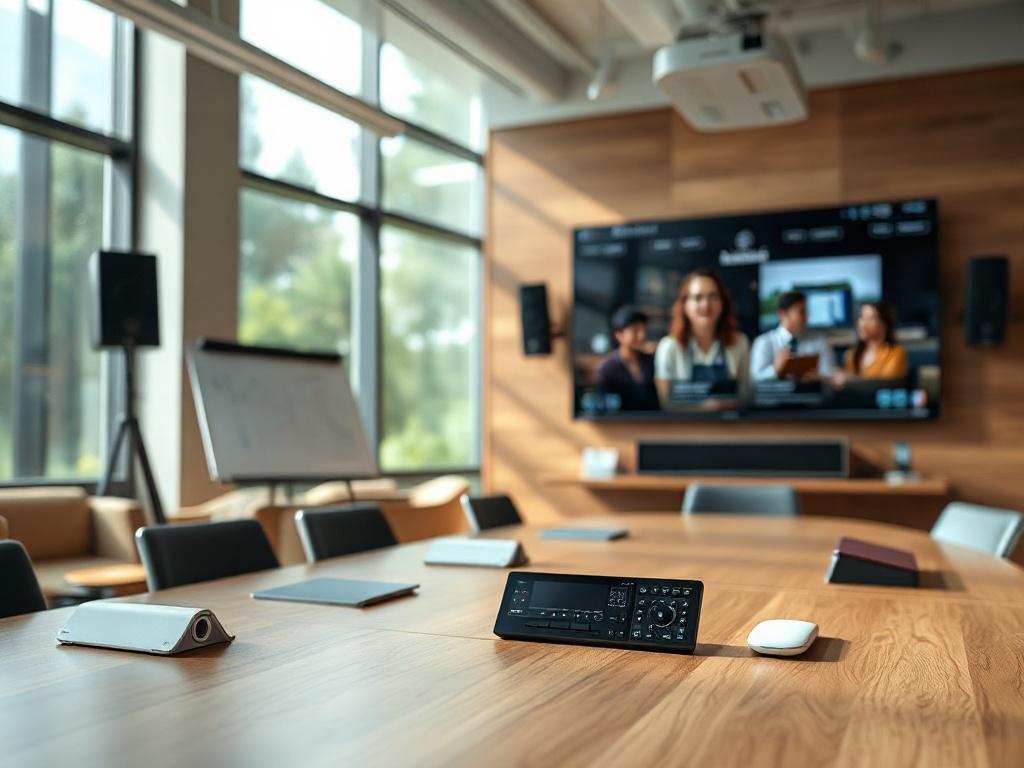
In the dynamic world of professional learning environments, effective training room AV design has become essential for delivering impactful training experiences and maximizing participant engagement. Whether you're an AV integrator, system designer, or technology consultant, understanding the essential components and best practices for training room AV systems is critical for creating functional learning spaces that support diverse training methodologies and modern delivery formats. This comprehensive guide explores the fundamental audio-visual components, integration strategies, design best practices, and professional tools like XTEN-AV X-Draw that enable AV professionals to deliver reliable, user-friendly, and cost-effective training room solutions.
Training room AV design involves the strategic selection and integration of audio-visual technology that creates optimal learning conditions, supports instructor effectiveness, and enables seamless hybrid training delivery. A properly designed training room AV system combines display technology, audio reinforcement, video capture, signal management, and intuitive control to create an integrated solution that enhances rather than hinders the training process.
Key Takeaways
Before exploring the essential components and best practices of training room AV design, here are the critical insights every AV professional should understand:
- Display systems must provide adequate size, resolution, and brightness for content visibility from all seating positions
- Audio quality directly impacts learning effectiveness and requires professional-grade speakers, microphones, and signal processing
- Video conferencing capabilities are now baseline requirements for training rooms supporting hybrid participation
- Signal management systems must handle multiple content sources with seamless switching and reliable performance
- Control systems should prioritize simplicity and intuitive operation over complex feature sets
- Best practices emphasize user-centered design, comprehensive documentation, and thorough testing before room handoff
- XTEN-AV X-Draw emerges as the premier software solution for AV integrators designing training room systems with speed and accuracy
- AI-powered tools and automation technologies are transforming component selection, system design, and project documentation
Essential Display Components for Training Rooms
Primary Display Selection CriteriaDisplay technology forms the visual foundation of training room AV systems, directly impacting content visibility, participant attention, and presentation effectiveness. AV integrators must carefully evaluate display options based on room characteristics and training requirements.
Flat-panel displays dominate modern training room installations, offering 4K resolution, commercial-grade reliability, long operational lifespans (50,000+ hours), and minimal maintenance requirements. For training rooms with viewing distances under 30 feet, 75-98 inch displays provide adequate screen size for detailed content including spreadsheets, code, and technical diagrams.
Display sizing calculations follow the industry-standard formula: Maximum viewing distance = Screen height × 6 for general presentations, or Screen height × 4 for detailed content. For a training room with a 25-foot depth, calculate minimum screen height: 25 feet ÷ 6 = 4.17 feet (50 inches), suggesting an 85-inch diagonal display (approximately 42 inches tall) meets general requirements.
Laser projectors remain relevant for specific applications: Large training halls requiring 120+ inch images, spaces with challenging ambient light where 5,000+ lumen brightness is necessary, and environments where screen flexibility (portable, retractable) provides operational advantages. Ultra-short-throw laser projectors eliminate shadow issues and work effectively in shallow rooms.
LED video walls increasingly appear in high-end training facilities, offering seamless large-format images, excellent brightness, wide viewing angles, and impressive visual impact. Fine-pitch LED (1.5mm-2.5mm pixel pitch) provides sufficient resolution for training content when viewed from appropriate distances.
Display Technology SpecificationsResolution requirements have standardized on 4K (3840×2160) for training room displays in 2026. 4K resolution ensures clarity for small text, detailed graphics, software interfaces, and high-definition video content. While 1080p displays remain functional, they no longer meet professional standards for new installations.
Brightness specifications must account for ambient lighting conditions: Corporate training rooms with standard office lighting require 400-500 nits minimum, spaces with significant natural light need 600-800 nits, and environments where lights remain on during presentations demand projectors with 4,000-6,000 lumens.
Aspect ratio considerations impact content display: 16:9 displays match most digital content, presentation software, and video conferencing platforms. 21:9 ultrawide displays enable side-by-side content without image reduction, valuable for technical training requiring simultaneous viewing of multiple windows.
Commercial-grade displays offer critical advantages over consumer models: Portrait/landscape orientation support, 24/7 operation ratings, integrated scheduling, RS-232/network control, secure mounting points, and 3-5 year commercial warranties. These features justify premium pricing for professional installations.
Secondary Display StrategiesDual-display configurations significantly enhance training effectiveness by separating content types: Primary display shows main presentation content, while secondary display presents participant video feeds during hybrid sessions, supplementary reference materials, real-time polling results, or discussion chat streams.
Confidence monitors positioned at instructor stations allow presenters to view current slides, upcoming content, speaker notes, and timing information without turning away from participants. 17-24 inch displays mounted at lecterns or instructor desks serve this purpose effectively.
Preview monitors in control rooms or technical booths enable AV technicians to monitor active sources, video conference feeds, and system status during critical training events requiring technical support.
Professional Audio System Components
Speaker Systems and Audio DistributionAudio quality represents the most underestimated component of training room AV design, yet poor audio performance fundamentally undermines learning outcomes more than any other technical deficiency. Speech intelligibility must meet or exceed 0.70 STI (Speech Transmission Index) throughout the training space.
Ceiling speaker arrays provide optimal audio distribution for training rooms: Line array configurations in rectangular spaces, distributed patterns in square rooms, and zoned coverage in large multipurpose facilities. Deploy speakers at 12-18 foot spacing for speech reproduction, using premium 2-way ceiling speakers from manufacturers like JBL Professional, QSC, Extron, or Bose Professional.
70V distributed audio systems offer installation flexibility, centralized amplification, individual volume control, and scalability for multiple zones. Modern 70V systems using quality transformers deliver excellent audio fidelity suitable for professional training environments.
Line array speakers mounted at room perimeter provide superior speech intelligibility in rectangular training rooms with high ceilings (12+ feet). Vertical line arrays direct audio energy toward seating areas rather than reflective ceiling surfaces, reducing reverberation and improving clarity.
Subwoofers enhance multimedia presentations, video playback, and immersive content, though remain optional for lecture-focused training rooms. When specified, ceiling-mounted subwoofers (JBL Control 47, QSC AcousticCoverage) provide low-frequency extension without floor space consumption.
Microphone Systems and Wireless TechnologyWireless microphone systems enable instructor mobility, audience participation, and hybrid training support. AV integrators must specify reliable wireless technology appropriate for training environments.
Digital wireless lavalier microphones represent the gold standard for instructor audio: Shure Axient Digital, Sennheiser Digital 6000, Audio-Technica System 10 Pro, and Sony DWX series offer excellent audio quality, interference resistance, and battery efficiency. Digital wireless systems operating in 1.9GHz DECT band or upper UHF frequencies (900MHz) avoid congested spectrum problematic with traditional UHF systems.
Handheld wireless microphones support audience questions, interactive discussions, and roaming presenters. Provide 2-4 handheld microphones for medium training rooms (20-30 people) and 4-8 units for larger spaces. Implement charging stations within equipment racks to ensure charged batteries for every training session.
Ceiling microphone arrays with beamforming technology have revolutionized hybrid training audio: Shure MXA910, Biamp Parlé TCM-X, Sennheiser TeamConnect Ceiling 2, and Audio-Technica ATND1061 automatically track speakers, provide acoustic echo cancellation, noise suppression, and auto-mixing without requiring individual microphones.
Gooseneck microphones at podiums and instructor stations offer reliable backup when wireless systems experience interference or battery failures. Shure MX series, Audio-Technica ES series, and Beyerdynamic Classis gooseneck microphones provide professional speech reproduction.
Digital Signal ProcessingDSP (Digital Signal Processor) platforms form the audio control center of professional training room AV systems. Modern DSP processors provide:
- Automatic microphone mixing preventing phase cancellation and feedback
- Acoustic echo cancellation (AEC) for video conferencing applications
- Automatic gain control (AGC) maintaining consistent volume levels
- Feedback suppression preventing audio feedback loops
- Equalization (EQ) compensating for room acoustic characteristics
- Compression controlling dynamic range for speech intelligibility
- Routing matrices directing audio signals to appropriate outputs
- Presets enabling one-touch configuration changes
Leading DSP platforms for training rooms include QSC Q-SYS Core, Biamp Tesira, Extron DSP, BSS Soundweb London, and Symetrix Prism. Select DSP systems with sufficient input/output capacity, processing power for required algorithms, and network connectivity for remote management.
Video Conferencing and Camera Systems
Camera Technology for Hybrid TrainingHybrid training delivery combining in-room and remote participants demands professional camera systems capturing high-quality video of instructors and training spaces.
PTZ (Pan-Tilt-Zoom) cameras provide operational flexibility: Wide-angle shots showing entire training rooms during introductions, medium shots framing instructors during presentations, and tight shots capturing facial expressions during discussions. 4K PTZ cameras from Panasonic, Sony, Canon, and PTZOptics deliver broadcast-quality video.
Auto-tracking cameras using AI algorithms revolutionize video production for training rooms: Huddly IQ, AVer CAM520 Pro3, Poly Studio E70, and Logitech Rally automatically frame active speakers, follow movement, and provide smooth transitions without manual camera operation. This automation creates professional video without requiring dedicated camera operators.
Multi-camera systems in large training facilities provide director-quality production: Instructor cameras for presenter close-ups, room cameras showing participant reactions, content cameras capturing whiteboard work or product demonstrations, and confidence cameras for instructor feedback. Camera switchers with automated switching based on audio priority create dynamic video for remote participants.
Camera placement principles ensure optimal video quality: Position cameras at eye level (5-6 feet) near primary displays to simulate natural eye contact with remote attendees, angle cameras slightly downward to avoid unflattering perspectives, provide adequate lighting for facial recognition and expression visibility, and avoid backlit positions creating silhouette effects.
Video Conferencing Platform IntegrationTraining room AV systems must seamlessly integrate with organizational video conferencing platforms: Microsoft Teams, Zoom, Webex, Google Meet, and others depending on corporate standards.
Native room systems from Poly, Logitech, Cisco, Yealink, and Crestron provide certified integration with leading platforms, offering one-touch meeting join, automatic updates, optimized codecs, and technical support. These appliance-based solutions deliver superior user experience compared to laptop-connected systems.
BYOD (Bring Your Own Device) support allows instructors to connect personal computers while leveraging room AV equipment. Implement USB-C connectivity or USB switching at instructor positions, routing room cameras, microphones, speakers, and displays to connected devices.
Network infrastructure requirements for video conferencing include dedicated bandwidth (5-10 Mbps per participant), Quality of Service (QoS) prioritization, firewall configuration for platform-specific ports, and network monitoring ensuring consistent performance during training sessions.
Signal Management and Switching Systems
Presentation Switchers and ScalersTraining sessions involve multiple content sources requiring reliable switching: Instructor laptops, BYOD devices, document cameras, media players, video conferencing systems, and whiteboard captures. Presentation switchers must handle these diverse inputs seamlessly.
Matrix switchers from Crestron, Extron, Kramer, and AMX provide flexible routing of multiple sources to multiple displays: 8×4, 12×6, or 16×8 configurations accommodate typical training room requirements. Modern switchers include integrated scaling, format conversion, test pattern generation, and network control.
HDBaseT technology enables single-cable transmission of 4K video, audio, control signals, USB, and power over Category cable up to 330 feet. HDBaseT switchers simplify installation, reduce cable congestion, and support distributed AV architectures in large training facilities.
Wireless presentation systems eliminate cable connections for content sharing: Barco ClickShare Conference, Mersive Solstice Active Learning, Kramer VIA, and Crestron AirMedia enable participants to share content from laptops, tablets, and smartphones using software clients or hardware buttons. These systems dramatically improve training flow and reduce setup time.
Format compatibility requires careful attention: Ensure entire signal chain supports 4K resolution, HDCP 2.2 compliance, appropriate color spaces (RGB, YCbCr), and audio formats (PCM, Dolby, DTS) to prevent compatibility issues with diverse source devices.
Cable Management and Signal ExtensionProfessional cable management separates amateur installations from professional deployments: Labeled cables at both termination points, service loops at connections, proper bend radius for cable types, separation of power and signal cables, and accessible cable pathways for future modifications.
Signal extension over long distances requires appropriate technology: HDBaseT transceivers for 4K signals up to 330 feet, fiber optic extenders for extreme distances or high-EMI environments, active HDMI cables for moderate runs (50-100 feet), and category cable with baluns for budget-conscious installations.
Control System Design and User Interfaces
Control System SelectionControl systems determine user experience, system reliability, and operational complexity of training room AV installations. AV integrators must balance feature sets with usability requirements.
Touch panel control systems from Crestron, Extron, AMX, QSC, and Kramer provide centralized control of displays, sources, audio, lighting, shades, and room scheduling. Select control processors with sufficient I/O capacity, processing power, network connectivity, and third-party integration capabilities.
Wall-mounted touch panels (7-10 inches) at instructor stations provide primary control, while tabletop touch panels offer flexible positioning. Wireless touch panels (tablets) enable control from anywhere in the training space, particularly useful for roaming instructors.
Simple button panels provide backup control and guest-friendly operation: Crestron 3-Series Keypads, Extron Cable Cubby, and AMX Enova DGX button panels offer one-touch functions ("Start Training," "Join Meeting," "Display Laptop") accessible to non-technical users.
User Interface Design PrinciplesEffective control interfaces prioritize task-based navigation over equipment-based menus: Users should select "Display Laptop" rather than navigate through "Sources > HDMI > Input 3 > Display On." This functional approach reduces training burden and improves technology adoption.
Visual feedback ensures users understand system state: Highlight active sources, display volume levels, show microphone status (muted/unmuted), indicate room booking information, and provide help prompts for common tasks.
Minimal navigation depth prevents user confusion: Limit interface hierarchy to 2-3 levels maximum, group related functions, provide breadcrumb navigation, and include "Home" buttons for quick return to main screens.
Best Practices for Training Room AV Design
Design Phase Best PracticesComprehensive discovery establishes project foundation: Conduct site visits observing existing training sessions, interview frequent instructors about pain points and feature requests, document room dimensions and architectural constraints, photograph existing conditions, and review organizational standards for technology and IT infrastructure.
Stakeholder engagement ensures buy-in and appropriate expectations: Include training managers, IT directors, facility managers, and representative instructors in design reviews, present visual mockups showing equipment placement, demonstrate similar installations, and explain design rationale for key decisions.
Acoustical analysis identifies treatment requirements: Measure room reverberation time using acoustic measurement tools, identify reflective surfaces requiring absorption, specify acoustic panels with appropriate NRC ratings, and verify HVAC noise levels meet NC-30 or NC-35 standards for training spaces.
Lighting coordination ensures optimal conditions for video conferencing and presentations: Provide separate control zones for general lighting, task lighting, and accent lighting, install dimmable fixtures with smooth dimming curves, position fill lights illuminating instructor faces during video conferencing, and avoid direct downlights creating harsh shadows.
Installation Best PracticesPre-installation planning prevents costly delays: Verify equipment delivery before scheduled installation dates, confirm site readiness including power, network, and structural support, coordinate access schedules with facility management, and review installation drawings with field teams before deployment.
Quality control measures ensure system reliability: Test all cables before termination using cable certifiers, verify signal quality at every connection point, document test results for warranty purposes, photograph cable labeling and rack layouts for service documentation, and conduct system burn-in for 24-48 hours before client handoff.
Calibration and tuning optimize system performance: Program DSP for room acoustics using measurement microphones, calibrate display color temperature and brightness levels, adjust camera exposure, white balance, and focus, test microphone levels and feedback suppression, and verify video conferencing quality with actual calls to remote participants.
Documentation and TrainingComprehensive documentation supports long-term success: Produce as-built drawings showing actual equipment locations, create signal flow diagrams and rack elevations, generate cable schedules with complete labeling details, provide equipment manuals and warranty information, develop maintenance schedules and service contact lists.
User training ensures technology adoption: Conduct hands-on training sessions with instructors, create quick-start guides with visual instructions, produce video tutorials for common operations, laminate reference cards placed at instructor stations, and provide remote training options for off-site instructors.
Ongoing support planning maintains system performance: Establish helpdesk procedures for first-level troubleshooting, create escalation paths for complex issues, schedule preventive maintenance visits, monitor system usage and issue reports, and plan refresh cycles for technology components.
Why XTEN-AV X-DRAW Transforms Training Room AV Design
For AV integrators tasked with designing training room AV systems, traditional CAD software and manual documentation workflows create significant inefficiencies that directly impact project profitability and delivery timelines. XTEN-AV X-DRAW addresses these challenges with a comprehensive platform purpose-built for AV system design.
Streamlined Floor Plan DesignX-DRAW enables AV professionals to import existing floor plans from AutoCAD, Visio, or PDF files, eliminating redundant drafting work. Within the unified interface, designers place displays, projectors, speakers, microphones, cameras, lecterns, and seating arrangements using intuitive drag-and-drop functionality.
The platform supports complete documentation including ceiling layouts, equipment rack diagrams, and elevation views within a single design environment, ensuring consistency across all project documentation.
Automated Technical DocumentationX-DRAW's most transformative capability is automatic generation of AV schematics and signal flow diagrams. As designers add equipment to room layouts, the software automatically creates connection diagrams showing how displays, audio systems, switchers, control systems, and video conferencing components interconnect.
This automation eliminates hours of manual drafting while ensuring documentation accuracy. When equipment changes during design iterations, connection diagrams update dynamically, maintaining synchronized documentation throughout the project lifecycle.
Comprehensive AV Product DatabaseX-DRAW provides access to over one million AV products from thousands of manufacturers, dramatically accelerating equipment selection. AV integrators avoid time-consuming research and manual specification writing required with generic CAD tools.
AI-powered search functionality understands natural language queries: Type "4K PTZ camera with auto-tracking" and receive relevant recommendations from multiple manufacturers with complete specifications, compatibility information, and current pricing data.
Intelligent Cable ManagementCable documentation represents a significant time investment in AV projects. X-DRAW automatically generates cable schedules, creates cable IDs following customizable conventions, calculates cable lengths based on pathway routing, and produces connection details for installation teams.
This automation reduces manual errors, ensures accurate material estimates, and provides installation teams with clear documentation preventing field confusion.
Accurate Cost EstimationX-DRAW automatically generates Bills of Materials directly from training room designs, eliminating manual transfer between drawings and estimate spreadsheets. Every component specified in the design appears in the BOM with quantities, part numbers, and current pricing.
Equipment lists, labor calculations, and project pricing remain synchronized, supporting accurate proposals and preventing costly estimation errors that erode project profitability.
Rapid Proposal GenerationConvert training room designs into client-ready proposals within X-DRAW, automating document formatting, specification writing, and pricing presentation. Customizable templates maintain brand consistency while incorporating design visualizations and technical specifications.
AV integrators report reducing proposal preparation time from multiple days to several hours, enabling faster response to competitive opportunities and improving win rates.
Standardized Design TemplatesTraining room deployments across multiple locations benefit from X-DRAW's template functionality, allowing designers to create reusable configurations for standard room types. This approach ensures consistency, reduces engineering time, and simplifies maintenance through equipment standardization.
Cloud-Based CollaborationAV projects involve distributed teams including sales, engineering, project management, and field installation. X-DRAW's cloud architecture enables real-time collaboration, eliminating version-control issues common with email-based workflows.
Centralized project data ensures all team members work from current information, improving coordination and reducing miscommunication errors.
Project Execution IntegrationBeyond design, X-DRAW extends into project management workflows, allowing teams to track installation tasks, equipment delivery, labor hours, and project milestones within the platform.
Field technicians access current drawings through mobile devices, ensuring installations follow latest specifications. As-built updates flow directly into the system, maintaining accurate records for service and future modifications.
Measurable Business ImpactAV integrators using X-DRAW for training room projects consistently report:
- 60-70% reduction in design time compared to traditional workflows
- Significant decrease in documentation errors and installation problems
- Automatic BOM generation improving cost accuracy and margins
- Standardized designs reducing engineering variability across projects
- Enhanced team collaboration between sales, engineering, and operations
- Faster proposal turnaround improving competitive positioning
- Consistent documentation quality meeting professional standards
For AV professionals specializing in training environments, XTEN-AV X-DRAW represents the most comprehensive software platform available for designing, estimating, and managing training room AV systems in 2026.
AI and Automation in Training Room AV
AI-Powered Equipment RecommendationsArtificial intelligence is revolutionizing component selection in training room AV design. AI algorithms analyze room characteristics (dimensions, seating, acoustics, lighting) and usage requirements (capacity, training types, technology needs) to recommend optimal equipment configurations.
Machine learning models trained on thousands of successful installations suggest speaker quantities and placement, microphone types and coverage, display sizing and positioning, and camera configurations for optimal framing.
Automated Design ValidationAI systems provide design validation, checking for common errors including insufficient audio coverage, inadequate display sizing, signal incompatibilities, power capacity issues, network bandwidth constraints, and control system conflicts.
These automated checks identify problems during design phases rather than installation, reducing costly field corrections and project delays.
Predictive MaintenanceAI-powered monitoring systems analyze equipment performance data to predict component failures before they occur, enabling proactive maintenance and preventing training disruptions. Firmware and software updates deploy automatically during off-hours, maintaining system security and performance.
EXPLORE XTEN-AV 15 DAYS FREE TRIAL
Training Room AV Component Checklist
Use this comprehensive checklist when specifying training room AV components:
Display Systems
- ☐ Primary displays sized appropriately for viewing distances
- ☐ 4K resolution for content clarity
- ☐ Commercial-grade panels with extended warranties
- ☐ Adequate brightness (400-500+ nits) for ambient lighting
- ☐ Secondary displays for hybrid training or supplementary content
- ☐ Confidence monitors at instructor stations
Audio Systems
- ☐ Ceiling speakers providing even coverage
- ☐ 70V distributed systems or amplified speakers
- ☐ Wireless lavalier microphones for instructors
- ☐ Handheld microphones for audience participation
- ☐ Ceiling microphone arrays for hybrid training
- ☐ DSP with AEC, AGC, feedback suppression
- ☐ Adequate amplification for room size
Video Systems
- ☐ 4K PTZ cameras or auto-tracking cameras
- ☐ Camera positioning at eye level near displays
- ☐ Adequate lighting for video conferencing
- ☐ Multi-camera support for large rooms (optional)
Signal Management
- ☐ Presentation switcher with adequate inputs (8-12+)
- ☐ 4K switching and scaling support
- ☐ Wireless presentation system for BYOD
- ☐ HDBaseT or fiber extension for long runs
- ☐ Cable management and labeling systems
Control Systems
- ☐ Touch panel control at instructor station
- ☐ Backup button panels for simple operation
- ☐ Task-based interface design (not equipment-based)
- ☐ Presets for common scenarios
- ☐ Network connectivity for remote monitoring
Infrastructure
- ☐ Dedicated power circuits for AV equipment
- ☐ UPS backup for critical components
- ☐ Network infrastructure (Gigabit, PoE++)
- ☐ Cable pathways and conduit
- ☐ Equipment rack with proper ventilation
- ☐ Acoustic treatment (panels, ceiling tiles)
Integration
- ☐ Video conferencing platform integration
- ☐ Room scheduling system integration
- ☐ Corporate IT security compliance
- ☐ Single sign-on support (if required)
Frequently Asked Questions
What are the most critical components in a training room AV system?The most critical components are audio systems and control interfaces. Poor audio quality undermines training effectiveness more than any other technical deficiency, requiring professional speakers, quality microphones, and proper DSP processing. Control systems determine user experience and technology adoption rates – if instructors struggle with complex controls, even excellent AV equipment won't be utilized effectively. Display technology ranks third in importance, as adequate sizing and resolution are relatively straightforward to achieve with modern flat panels. Focus your budget and design attention on audio quality and intuitive control for maximum impact.
How do I calculate the right display size for a training room?Calculate display size using viewing distance formulas: Maximum viewing distance = Screen height × 6 for general presentations, or Screen height × 4 for detailed content like spreadsheets or code. Example: For a training room with 30-foot depth, calculate minimum screen height: 30 feet ÷ 6 = 5 feet (60 inches), suggesting a 100-inch diagonal display (approximately 49 inches tall) for general use, or 150-inch diagonal (73 inches tall) for detailed content. Always verify calculations with actual room measurements and consider seating layout – angled seating may reduce effective viewing distances for side positions.
Should I use ceiling microphones or wireless lavalier microphones?The optimal approach uses both microphone types for different purposes: Wireless lavalier microphones provide superior audio quality for primary instructors, offering consistent voice pickup, mobility, and isolation from room noise. Ceiling microphone arrays excel for hybrid training by capturing audience questions, discussions, and instructor audio when wireless microphones aren't used, while providing automatic echo cancellation for video conferencing. This combined approach offers flexibility, reliability, and optimal performance for diverse training scenarios. Budget-conscious projects should prioritize wireless lavalier systems for instructor audio, adding ceiling arrays as budget permits or when hybrid training is essential.
What's the difference between consumer displays and commercial displays for training rooms?Commercial displays offer critical advantages justifying higher costs: Extended operation ratings (16-24 hours daily vs. 8 hours for consumer models), 3-5 year commercial warranties (vs. 1 year consumer), RS-232/network control integration enabling automation, portrait orientation support for digital signage, built-in scheduling and power management, commercial-grade mounting points rated for permanent installation, higher brightness levels (400-500 nits standard), integrated media players (optional), and longer product lifecycles with extended spare parts availability. For professional training facilities, commercial displays provide reliability, integration capabilities, and total cost of ownership advantages that outweigh initial price premiums.
How important is acoustic treatment in training room AV design?Acoustic treatment is critically important yet frequently neglected. Poor room acoustics cause excessive reverberation, echo, and speech intelligibility problems that technology alone cannot overcome. Target reverberation times of 0.6-0.8 seconds for training spaces under 10,000 cubic feet. Implement acoustic panels on walls, absorptive ceiling tiles, carpeting, fabric-wrapped furniture, and acoustic curtains at windows. Budget $2,000-$15,000 for acoustic treatment depending on room size and existing conditions. Video conferencing performance dramatically improves with proper acoustics, as echo cancellation systems work more effectively in acoustically controlled environments. Consider acoustic treatment as essential infrastructure rather than optional upgrade.
What control system platform should I specify for training rooms?Control system selection depends on project scope, integrator expertise, and client requirements. Crestron leads for enterprise deployments requiring extensive integration, offering robust hardware, comprehensive APIs, and mature programming tools. Extron excels for education and corporate markets, providing reliable systems, simplified programming, and excellent technical support. QSC Q-SYS suits audio-centric installations with integrated DSP and growing control capabilities. AMX (Harman) serves existing AMX ecosystems and large corporate deployments. For simple training rooms, consider Crestron Home, Control4, or manufacturer-specific solutions (Extron, QSC) that reduce programming complexity. Select platforms your team knows well – programmer expertise matters more than platform features for project success.
How can I future-proof a training room AV system?Future-proof your training room investment through strategic planning: Install oversized conduit (minimum 2-inch) and pull strings for future cabling, specify 4K infrastructure throughout the signal chain even if current sources are 1080p, implement HDBaseT or AVoIP enabling equipment upgrades without rewiring, select modular systems allowing component replacement without complete redesign, choose manufacturers with long product lifecycles and backward compatibility commitments, provision adequate network capacity (Gigabit+ switching, PoE++) for future IP devices, use control systems with software-based configuration enabling updates without hardware changes, and plan technology refresh schedules: Displays and core infrastructure (7-10 years), control systems (5-7 years), computers and peripherals (3-5 years). Modular architecture and adequate infrastructure provide better long-term value than absolute latest technology.
Conclusion
Designing effective training room AV systems requires comprehensive understanding of essential components, integration best practices, and user-centered design principles. From selecting appropriate displays and implementing professional audio systems to integrating video conferencing capabilities and designing intuitive controls, every component decision impacts training effectiveness and long-term system success.
The training room AV landscape in 2026 is characterized by hybrid delivery requirements, AI-enhanced automation, cloud-based design tools, and sophisticated platforms like XTEN-AV X-Draw that transform how AV integrators approach these projects. Professional-grade components, thoughtful system design, quality installation practices, and comprehensive documentation combine to create training environments that support organizational learning objectives and deliver measurable value.
For AV integrators, consultants, and system designers, mastering the essential components and best practices of training room AV design positions your organization as a trusted advisor capable of delivering reliable solutions that meet demanding client requirements. The convergence of technical expertise, design excellence, efficient workflows, and advanced software tools defines successful training room deployments in today's competitive AV market.
As learning technologies continue evolving with AI integration, immersive media, and advanced collaboration tools, investing in professionally designed training room AV systems built on solid fundamentals remains essential for organizations committed to effective training delivery and continuous workforce development. The principles, components, and best practices outlined in this guide provide a comprehensive framework for creating training spaces that serve instructors and learners effectively for years to come.