The debate between specialized schematic drawing software and traditional CAD tools has reached a critical turning point for AV system integrators in 2026. While general-purpose CAD platforms like AutoCAD and AutoCAD Electrical have dominated technical documentation for decades, the emergence of purpose-built AV platforms is fundamentally challenging their relevance for audio visual professionals. The right program to make schematics no longer means adapting electrical engineering software for AV applications—it means using intelligent platforms designed specifically for audiovisual workflows.
Choosing the best program to make schematics directly impacts engineering productivity, documentation accuracy, project timelines, and ultimately business profitability. Traditional CAD tools offer power and precision but require extensive customization, lengthy training, and significant effort to adapt for AV-specific requirements. Modern schematic drawing software like XTEN-AV X-DRAW eliminates these barriers through AI-powered automation, built-in AV libraries, and integrated workflows that connect design directly to project delivery.
This comprehensive comparison explores the practical differences between traditional CAD platforms and specialized AV schematic software, helping system integrators make informed decisions based on their team capabilities, project complexity, and business objectives. We'll examine functionality, learning curves, cost considerations, and real-world performance to determine which approach delivers the best outcomes for AV professionals in 2026.
Key Takeaways
- Traditional CAD tools were designed for electrical engineering and architectural design, not AV-specific workflows, requiring extensive customization and expertise
- Purpose-built AV schematic software delivers 60-70% faster documentation through automation and industry-specific features
- Learning curves differ dramatically: CAD expertise takes months to develop, while AV-specific platforms enable productivity within days
- AI-powered automation in modern schematic software eliminates repetitive tasks that traditional CAD handles manually
- Cloud-based collaboration in specialized platforms outperforms file-based CAD workflows for distributed teams
- Total cost of ownership favors AV-specific software when accounting for training, productivity, and error reduction
- Integration capabilities differ significantly: AV platforms connect design to sales and installation; CAD tools focus only on drawings
- XTEN-AV X-DRAW represents the next generation of AV documentation, combining CAD precision with AV-specific intelligence
What Are Traditional CAD Tools?
Definition and Origins
Traditional CAD (Computer-Aided Design) tools refer to general-purpose drafting software originally developed for mechanical engineering, electrical design, and architectural documentation. Platforms like AutoCAD, AutoCAD Electrical, SolidWorks Electrical, and EPLAN provide powerful 2D and 3D drawing capabilities with extensive customization options.
Core Capabilities
Traditional CAD platforms excel at:
- Precise geometric drawing with mathematical accuracy
- Layering systems for complex documentation
- Dimension management and annotation tools
- Block libraries for reusable components
- Plot configuration for printing and PDF generation
- File format standards (DWG, DXF) with wide compatibility
- Scripting capabilities (LISP, VBA) for automation
Industry Heritage
CAD tools evolved from engineering disciplines where:
- Electrical schematics follow IEC/IEEE standards
- Panel layouts require precise measurements
- Building drawings integrate with architectural workflows
- Mechanical assemblies demand 3D modeling
This heritage creates both strengths (precision, power) and limitations (complexity, AV irrelevance) for audio visual applications.
Adaptation Challenges for AV
AV integrators using traditional CAD must:
- Create custom symbol libraries for AV equipment (microphones, speakers, displays)
- Develop labeling conventions matching AV standards rather than electrical codes
- Build templates for signal flow diagrams and rack elevations
- Establish layer standards for AV-specific documentation
- Train staff in complex CAD interfaces designed for engineers
This customization burden consumes significant resources before productive work begins.
What Is Schematic Drawing Software for AV?
Purpose-Built Philosophy
AV schematic drawing software represents a fundamentally different approach: platforms designed from inception specifically for audio visual system integrators. Rather than adapting electrical engineering tools, these platforms incorporate AV workflows, industry terminology, and common tasks natively.
Core Differentiation
AV-specific platforms provide:
- Pre-built symbol libraries for common AV equipment (displays, projectors, speakers, processors)
- Signal flow understanding recognizing audio, video, and control protocols
- Automatic cable labeling following AV conventions
- Equipment databases with manufacturer specifications
- BOM integration linking drawings to procurement
- Simplified interfaces designed for system designers rather than CAD specialists
Modern Platform Characteristics
Contemporary AV schematic software incorporates:
- Cloud-based architecture enabling remote access and collaboration
- AI-powered automation generating diagrams from equipment selections
- Integration capabilities connecting design to sales and project management
- Mobile applications for field technician access
- Automatic documentation generation for proposals and handoff
Workflow Integration
Unlike standalone CAD tools, AV platforms connect:
- Sales processes (proposals, quotes)
- Design workflows (schematics, layouts)
- Procurement systems (BOMs, purchase orders)
- Installation documentation (cable schedules, commissioning guides)
- Project management (timelines, resource allocation)
This end-to-end integration represents a paradigm shift from isolated drawing tools to comprehensive project platforms.
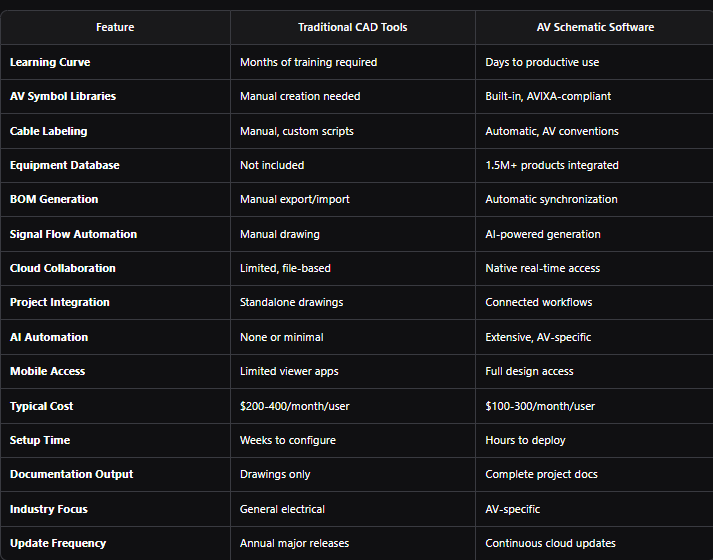
Traditional CAD vs AV Schematic Software: Direct Comparison
Comparison Table: Key Differences
Learning Curve and Training Investment
Traditional CADAutoCAD and similar platforms require:
- 40-80 hours of formal training for basic competency
- 3-6 months of daily use for proficiency
- Understanding of CAD concepts (layers, blocks, attributes, xrefs)
- Command knowledge (hundreds of commands, keyboard shortcuts)
- Ongoing training for version updates and new features
Total training investment: $3,000-8,000 per user in direct costs plus opportunity cost of unproductive time.
AV Schematic SoftwarePurpose-built platforms offer:
- 4-8 hours of onboarding for basic productivity
- 1-2 weeks to master advanced features
- Intuitive interfaces based on familiar design patterns
- Video tutorials and contextual help reducing training dependence
- Template libraries enabling immediate productivity
Total training investment: $500-1,500 per user with faster time-to-value.
Customization Requirements
Traditional CADOut-of-box CAD tools lack AV-specific capabilities:
- Custom block creation: 20-40 hours for basic AV library
- Template development: 10-20 hours per document type
- Script development: 40-100 hours for automation workflows
- Standard establishment: Defining layers, colors, line types, text styles
- Ongoing maintenance: Updating libraries for new equipment
Customization investment: 100-300 hours of engineering time ($10,000-30,000 value).
AV Schematic SoftwarePurpose-built platforms include:
- Complete AV symbol libraries immediately available
- Industry-standard templates for common deliverables
- Built-in automation requiring no scripting
- Manufacturer product databases continuously updated
- Minimal configuration to match company preferences
Customization investment: 5-15 hours for company branding and preferences ($500-1,500 value).
Documentation Speed and Efficiency
Traditional CADTypical project timelines using manual CAD workflows:
- Small conference room (simple system): 6-10 hours for complete documentation
- Medium room (video conferencing, multiple sources): 12-20 hours
- Large lecture hall (complex audio, recording): 25-40 hours
- Multi-room facility (10-20 rooms): 120-200 hours
Efficiency factors: Heavy manual work for cable labeling, symbol placement, BOM creation, and documentation generation.
AV Schematic SoftwareAutomated workflows dramatically reduce timelines:
- Small conference room: 2-3 hours (70% reduction)
- Medium room: 4-6 hours (70% reduction)
- Large lecture hall: 8-12 hours (70% reduction)
- Multi-room facility: 35-60 hours (70% reduction)
Efficiency drivers: AI automation, template replication, automatic cable labeling, integrated BOM, documentation generation.
Integration Capabilities
Traditional CADCAD platforms operate as standalone drawing tools:
- Export/import workflows for BOM data (manual, error-prone)
- File attachments for proposal integration
- No connection to project management or CRM systems
- Manual synchronization between drawings and specifications
- Version control through file naming or separate systems
Modern AV platforms provide native integration:
- Automatic BOM synchronization between design and procurement
- Direct proposal generation from schematic data
- Project management connections tracking design milestones
- CRM integration pulling customer requirements
- Field technician access to current documentation via mobile apps
This integration eliminates duplicate data entry and documentation discrepancies.
Why AV Integrators Are Moving Away from Traditional CAD
1. Excessive Complexity for AV Needs
Traditional CAD tools provide capabilities that AV projects rarely require:
- 3D modeling and solid modeling (unnecessary for AV schematics)
- Advanced mechanical design features (irrelevant to signal flow)
- Architectural coordination tools (beyond AV scope)
- Parametric constraints and geometric relationships (overkill for system diagrams)
AV integrators pay for and struggle with features they never use, while lacking AV-specific capabilities they need daily.
2. Productivity Bottlenecks
Manual workflows in CAD platforms create bottlenecks:
- Cable labeling consuming hours per project
- BOM creation requiring manual counting and data entry
- Symbol placement without intelligent equipment databases
- Template creation for each new project type
- Documentation generation through separate applications
These bottlenecks limit project capacity and engineer utilization.
3. Skills Gap Challenges
Finding CAD-proficient AV engineers proves increasingly difficult:
- Limited candidate pool with both AV knowledge and CAD expertise
- Lengthy onboarding before new hires become productive
- Competitive salaries for CAD specialists
- Retention challenges when CAD skills transfer to other industries
AV-specific software with intuitive interfaces expands the talent pool and accelerates onboarding.
4. Poor Collaboration Features
File-based CAD workflows hinder modern team collaboration:
- Email attachments and file servers creating version confusion
- No real-time editing forcing sequential work
- Check-in/check-out systems bottlenecking concurrent access
- Difficult review processes for remote stakeholders
- Mobile limitations restricting field access
Cloud-based AV platforms enable simultaneous collaboration that file-based CAD cannot match.
5. Limited Business Integration
CAD tools focus exclusively on drawing creation:
- No connection to sales systems for proposal generation
- No integration with accounting for project costing
- No link to procurement for equipment ordering
- No coordination with scheduling and resource management
Modern AV businesses need integrated platforms connecting engineering to entire operations, not isolated drawing tools.
6. Licensing and Cost Burden
Traditional CAD licensing creates financial challenges:
- High per-user costs ($200-400/month for AutoCAD Electrical)
- Annual maintenance fees for perpetual licenses
- Network licensing complexity for multi-office firms
- Additional software needed for documentation and proposals
- Training expenses beyond software costs
Total CAD ownership often exceeds $5,000-10,000 per user annually when including all factors.
7. Lack of AI and Automation
Traditional CAD platforms provide minimal automation:
- No AI-powered diagram generation
- No intelligent equipment recommendations
- No automated cable routing and labeling
- No automatic documentation production
- Manual repetition of common tasks
Modern AV platforms leverage AI to eliminate repetitive work that CAD requires manually.
How XTEN-AV X-Draw Outperforms Traditional CAD Tools
The Purpose-Built Advantage
XTEN-AV X-DRAW represents the next generation of AV documentation, combining the precision of CAD platforms with AV-specific intelligence that traditional tools cannot provide. Rather than forcing AV integrators to adapt electrical engineering software, X-DRAW was engineered specifically for audio visual workflows from inception.
Key Features That Make XTEN-AV X-DRAW the Best Schematic Drawing Software for AV System Integrators
1. AV-Specific Schematic Drawing EnvironmentUnlike general-purpose drawing tools, X-DRAW is designed specifically for audiovisual system design. Integrators can create:
- AV schematics with industry-standard symbols and terminology
- Signal flow diagrams showing complete audio/video paths
- Cable diagrams with automatic AV labeling conventions
- Rack layouts with front and rear elevations
- Floor plans with equipment placement and speaker coverage
- System drawings combining multiple views into comprehensive documentation
This unified environment eliminates the need to switch between multiple applications or extensively customize generic CAD.
2. AI-Powered Schematic GenerationX-DRAW includes AI-driven automation that can generate schematics based on products added to a project. This breakthrough capability significantly reduces manual drafting time and helps engineers create complete system diagrams faster than traditional manual CAD workflows.
The AI engine understands:
- Equipment types and their typical connections
- Signal flow patterns for common AV configurations
- Cable requirements based on distances and specifications
- Industry best practices for system architecture
Result: 60-70% reduction in schematic creation time compared to manual CAD drawing.
3. Automated Cable LabelingCable documentation is often one of the most time-consuming tasks in AV design. X-DRAW automatically generates:
- Cable labels with sequential numbering and AV conventions
- Wiring documentation showing both terminations
- Color coding by signal type (audio, video, control)
- Cable schedules listing lengths, types, and routing
- Consistent naming across all project drawings
This automation eliminates the hours that CAD users spend manually labeling each cable and reduces installation errors from labeling inconsistencies.
4. Integrated Signal Flow Diagram CreationThe platform enables integrators to design professional signal flow diagrams with:
- AV-specific symbols for microphones, speakers, displays, processors, mixers, and control systems
- Intelligent connections understanding signal compatibility
- Automatic routing between sources and destinations
- Visual clarity optimized for client presentations and troubleshooting
Traditional CAD requires manual creation of these diagrams using generic symbols and line routing.
5. Rack Layout and Elevation DesignX-DRAW allows users to create front and rear rack elevations, equipment placement diagrams, and rack layouts within the same ecosystem:
- Rack unit calculations and vertical spacing
- Equipment mounting with accurate dimensions
- Cable entry and power distribution documentation
- Thermal planning and airflow considerations
- Professional output meeting installation standards
This eliminates the need for separate rack design software that CAD users often purchase as add-ons.
6. Extensive AV Product LibraryThe platform provides access to a massive AV equipment database containing more than 1.5 million products and thousands of AV brands:
- Accurate specifications for current products
- I/O configurations and connection details
- Physical dimensions for rack and space planning
- Manufacturer documentation links
- Continuous updates adding new releases
Traditional CAD provides no equipment database, requiring integrators to manually create blocks and maintain specifications independently.
7. AVIXA-Compliant Symbol LibrariesX-DRAW includes AVIXA-standard symbols and AV-specific components, helping integrators create professional documentation that aligns with industry standards:
- Standardized representations for common AV equipment
- Professional appearance meeting client expectations
- Instant recognition by AV professionals
- Compliance with industry best practices
CAD users must create these symbol libraries manually or purchase third-party collections of limited quality.
8. Automatic Documentation GenerationOne of X-DRAW's biggest advantages is its ability to automatically generate:
- Bills of Materials (BOMs) with accurate quantities and specifications
- Scope of Work documents describing installation requirements
- Project documentation for client handoff
- Proposal-ready design outputs formatted for sales presentations
This automation removes duplicate work between engineering and sales teams, ensuring consistency across all project deliverables. CAD platforms output only drawings, requiring separate tools for documentation.
9. Cloud-Based CollaborationBeing cloud-based, X-DRAW enables engineering teams, sales teams, project managers, and field technicians to:
- Access drawings and documentation from anywhere on any device
- Collaborate in real-time without file conflicts
- Maintain version control automatically
- Track changes and project evolution
- Share with stakeholders without software installation
This improves collaboration throughout the project lifecycle compared to file-based CAD requiring email exchanges and version confusion.
10. Integrated Floor Plan Design ToolsIntegrators can upload floor plans, place AV equipment, create speaker layouts, and design complete room systems without switching to another application:
- Architectural drawing import (PDF, DWG, images)
- Equipment placement with drag-and-drop simplicity
- Speaker coverage visualization
- Cable pathway documentation
- Room system completeness
CAD users often need separate software for floor planning or must work in unfamiliar architectural environments.
11. Single Source of Truth for AV ProjectsX-DRAW centralizes drawings, documentation, product information, and project data into one platform:
- All project files in centralized location
- Synchronized changes across all documents
- No version confusion from multiple file copies
- Complete project history and revision tracking
- Consistent information from design through installation
This helps teams avoid version-control issues and maintain consistency across all project deliverables—a chronic problem with file-based CAD workflows.
12. Custom Libraries and Reusable Design BlocksUsers can create, save, and reuse custom blocks and design components through the "My Library" functionality:
- Company-specific templates and standards
- Reusable configurations for common room types
- Proprietary equipment blocks
- Standardized layouts accelerating similar projects
This accelerates future project creation and standardizes company workflows more easily than CAD block libraries requiring file management.
13. Faster Design-to-Installation WorkflowBecause schematics, rack layouts, cable schedules, BOMs, and project documentation are connected, X-DRAW reduces the time required to move from design to installation while minimizing costly mistakes:
- Single data entry propagating to all documents
- Automatic updates when equipment changes
- Synchronized information eliminating discrepancies
- Complete installation packages in minutes instead of hours
Traditional CAD requires manual synchronization between isolated documents, creating error opportunities.
14. Built-In AV Design AutomationThe platform automates many repetitive engineering tasks:
- Layout generation based on room templates and best practices
- Diagram creation from equipment selections and project parameters
- Documentation production for standard deliverables automatically
- Project updates propagating through all drawings instantly
This allows integrators to focus on system design and optimization rather than administrative work and manual drafting.
15. Eliminates Multiple Software SubscriptionsInstead of using separate tools for schematics (AutoCAD), rack diagrams (specialized software), floor plans (architectural tools), proposals (word processors), and documentation (various platforms), X-DRAW combines these capabilities into a unified AV-focused platform:
- Single subscription replacing multiple licenses
- Integrated workflow instead of application switching
- Reduced training burden from one interface
- Lower total cost from consolidation
Cost comparison: AutoCAD Electrical ($400/month) + rack software ($50/month) + proposal tools ($40/month) = $490/month vs. X-DRAW ($200-300/month) with superior AV capabilities.
Why AV Integrators Choose X-DRAW Over Traditional CAD
The biggest differentiator is that X-DRAW was built specifically for AV workflows. While generic CAD tools can draw diagrams, X-DRAW connects schematic creation with:
- Product databases (1.5M+ items)
- Cable schedules (automatic generation)
- Rack elevations (integrated design)
- BOM generation (synchronized)
- Proposals (direct output)
- Project documentation (complete packages)
All in a single environment optimized for audio visual projects. This results in faster design cycles, fewer errors, and more efficient project delivery for AV integrators compared to adapted CAD workflows.
EXPLORE XTEN-AV 15 DAYS FREE TRIAL
When Traditional CAD Might Still Make Sense
Existing CAD Infrastructure
Organizations with established CAD workflows may continue using traditional platforms when:
- Large engineering departments already CAD-trained with mature processes
- Extensive custom libraries representing years of development investment
- Integration with building design and MEP (Mechanical/Electrical/Plumbing) coordination required
- Long-term perpetual licenses already owned reducing incremental costs
Switching costs from deeply embedded CAD may temporarily exceed benefits of specialized platforms, though long-term efficiency still favors AV-specific tools.
Multi-Disciplinary Firms
Companies providing multiple services beyond AV may prefer unified CAD:
- Electrical contractors doing AV as secondary service
- MEP engineers occasionally designing AV systems
- General technology consultants with diverse specializations
However, even multi-disciplinary firms increasingly adopt specialized tools for each practice area rather than forcing one platform across different workflows.
Highly Customized Workflows
Rare cases where extreme customization is required:
- Proprietary methodologies incompatible with standard software
- Government contracts mandating specific file formats or legacy compatibility
- International projects requiring specialized standards not yet supported
These edge cases represent less than 5% of AV projects and often still benefit from hybrid approaches (AV software for design, CAD export for specialized requirements).
The Transitional Reality
Most integrators don't face binary choices. Common transition paths include:
- New projects in AV software, legacy support in CAD
- Design work in AV platform, final deliverables exported to CAD formats when required
- Gradual migration as staff turnover reduces CAD expertise dependency
- Team division: experienced engineers continue CAD, new hires use AV software
Market trend clearly favors AV-specific platforms, with traditional CAD declining for AV applications.
Frequently Asked Questions
Which is better for AV integrators: specialized schematic software or traditional CAD tools?Specialized AV schematic software like XTEN-AV X-DRAW delivers superior results for most AV integrators through 60-70% faster documentation, built-in AV libraries, automated workflows, and integrated project management. Traditional CAD tools offer more raw power but require extensive customization, lengthy training, and manual processes that AV-specific platforms automate. Unless you have established CAD infrastructure and trained CAD operators, purpose-built AV software provides better productivity, accuracy, and business value.
How much time can I save using AV-specific schematic software instead of AutoCAD?AV-specific platforms typically reduce documentation time by 60-70% compared to manual CAD workflows. A conference room requiring 8-10 hours in AutoCAD takes 2-3 hours in XTEN-AV X-DRAW. A multi-room project requiring 120-200 CAD hours completes in 35-60 hours with AV automation. Time savings come from AI-powered diagram generation, automatic cable labeling, template replication, integrated BOM creation, and documentation automation—all features traditional CAD lacks.
Do I need CAD training to use modern AV schematic software?No. Purpose-built AV platforms like XTEN-AV X-DRAW feature intuitive interfaces designed for system designers rather than CAD specialists. Most users achieve basic productivity within 4-8 hours of onboarding and master advanced features in 1-2 weeks. Traditional CAD requires 40-80 hours of formal training and 3-6 months of daily use for proficiency. AV-specific software eliminates CAD expertise as a hiring requirement, expanding your talent pool and accelerating new hire contributions.
Can AV schematic software integrate with my existing business systems?Modern AV platforms provide extensive integration capabilities that traditional CAD cannot match. XTEN-AV X-DRAW connects with CRM systems, project management tools, accounting software, and procurement platforms through APIs and direct integrations. Design data flows automatically to proposals, BOMs, and installation documentation without manual re-entry. File-based CAD workflows require export/import processes prone to errors and version discrepancies.
What is the total cost difference between CAD tools and AV-specific software?Total cost of ownership favors AV-specific platforms despite sometimes comparable license fees. AutoCAD Electrical costs $400/month/user but requires $3,000-8,000 training, $10,000-30,000 customization, and additional software for documentation. XTEN-AV X-DRAW costs $200-300/month with $500-1,500 training, minimal customization, and included documentation tools. Factor in 60-70% productivity gains, and AV software delivers ROI within 3-6 months while CAD remains expensive throughout ownership.
Will I lose precision or professional quality moving from CAD to AV software?No. Modern AV schematic platforms provide CAD-level precision for dimensions and layouts while adding AV-specific intelligence that improves rather than reduces quality. XTEN-AV X-DRAW outputs professional documentation meeting AVIXA standards and client expectations. The difference is efficiency: CAD achieves quality through manual precision; AV software achieves equivalent quality through intelligent automation, error-checking, and industry best practices built into the platform.
Can I export designs from AV software to CAD formats if needed?Yes. Professional AV platforms support standard file formats including DWG, PDF, and image exports ensuring compatibility when clients or partners require traditional CAD files. XTEN-AV X-DRAW enables export to various formats while maintaining design integrity. This provides flexibility to work in efficient AV software while delivering CAD-compatible outputs when necessary—combining best of both approaches without compromise.
Conclusion
The comparison between specialized schematic drawing software and traditional CAD tools reveals a clear trajectory: AV system integrators are rapidly migrating toward purpose-built platforms that understand their workflows, automate their repetitive tasks, and integrate their entire project lifecycle. While CAD platforms like AutoCAD Electrical remain powerful tools, they were designed for electrical engineering and architectural coordination, not the specific needs of audio visual professionals.
XTEN-AV X-DRAW exemplifies the next generation of AV documentation, combining the precision and professional output of traditional CAD with AI-powered automation, comprehensive AV libraries, cloud collaboration, and business integration that generic tools cannot provide. The 60-70% reduction in documentation time, elimination of custom development requirements, dramatically shorter learning curves, and integrated workflows from sales through installation create compelling advantages that transform operational efficiency and project profitability.
For most AV integrators in 2026, the question isn't whether specialized software outperforms traditional CAD—the productivity data and industry adoption clearly demonstrate superiority. The question is how quickly your organization can complete the transition from legacy CAD workflows to modern AV platforms that enable competitive advantages through documentation efficiency, design automation, and integrated project delivery.
Choosing the best program to make schematics means selecting tools specifically engineered for your industry, your workflows, and your business objectives. For audio visual system integrators, that choice increasingly points toward XTEN-AV X-DRAW and similar purpose-built platforms that represent the future of AV documentation—a future defined by intelligence, automation, and integration rather than manual drafting and isolated drawing files.
The transition from traditional CAD to specialized AV software isn't just a technology upgrade—it's a strategic transformation enabling greater project capacity, improved profitability, and enhanced competitive positioning in an increasingly sophisticated audio visual marketplace.