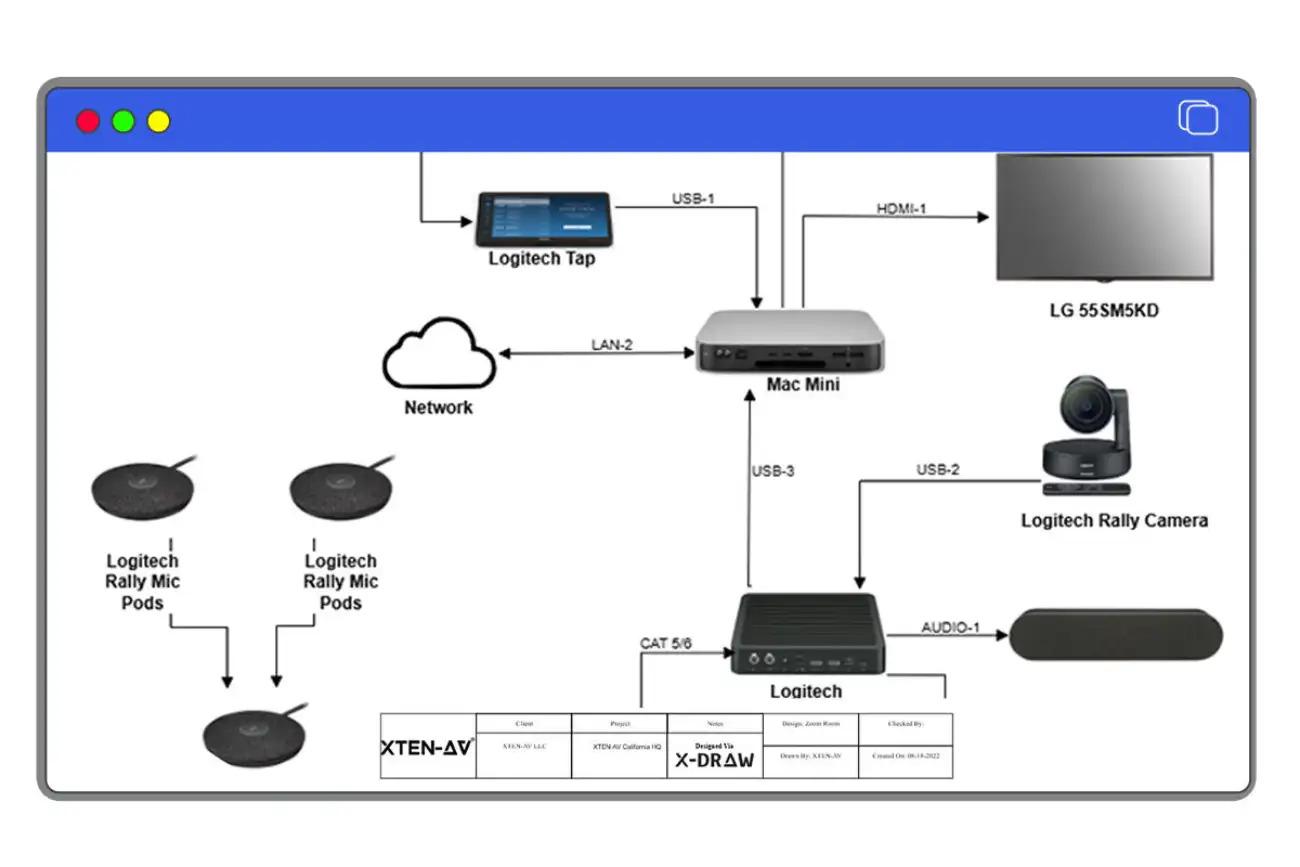
Prompt-based audio signal flow diagram creation is a revolutionary AI-powered design methodology where AV professionals describe system requirements in natural language and specialized software automatically generates complete signal flow diagrams, equipment selections, and routing architectures. Instead of manually dragging symbols and connecting lines, engineers type descriptions like "Create a 200-seat auditorium system with wireless mics, Dante networking, and distributed loudspeakers" and advanced signal flow graph generator tools produce technically accurate, professionally formatted diagrams in seconds.
For AV integrators, consultants, and system designers, this represents a fundamental shift from traditional CAD-based workflows to generative AI design. Choosing the best signal flow graph generator tool with prompt-based capabilities means selecting platforms that combine natural language processing, audio engineering knowledge bases, and manufacturer equipment libraries—enabling unprecedented design speed while maintaining technical precision and industry standards compliance.
This comprehensive guide explores how prompt-based diagram creation works, why it matters for modern AV workflows, and which platforms like XTEN-AV X-DRAW lead the industry in AI-assisted signal flow design.
What is Prompt-Based Audio Signal Flow Diagram Creation?
Prompt-based audio signal flow diagram creation leverages artificial intelligence and natural language processing (NLP) to transform written descriptions of AV system requirements into complete technical diagrams. Unlike traditional manual design methods or template-based approaches, prompt-based systems interpret user intent, apply audio engineering principles, and generate signal routing architectures automatically.
Core Technology Components:
1. Natural Language Processing (NLP) AI engines analyze text descriptions, extracting:
- System types (conference room, auditorium, house of worship)
- Equipment categories (microphones, mixers, DSPs, speakers)
- Quantity requirements (8 wireless mics, 4 zones, 200 seats)
- Technical specifications (Dante networking, assistive listening, recording)
- Performance criteria (speech intelligibility, music reproduction)
2. Audio Engineering Knowledge Base AI systems reference comprehensive databases of:
- Signal flow best practices (gain staging, feedback prevention)
- Equipment compatibility rules (impedance matching, connector types)
- System architecture patterns (distributed vs centralized processing)
- Industry standards (AVIXA, NSCA, manufacturer guidelines)
3. Manufacturer Equipment Libraries Prompt-based tools access catalogs containing:
- Real audio hardware (QSC, Shure, Yamaha, Biamp)
- Technical specifications (I/O configurations, power requirements)
- Product relationships (compatible accessories, required components)
- Pricing data for cost estimation
4. Generative Diagram Engine AI algorithms create:
- Device placement following signal flow conventions
- Connection routing respecting signal types and directions
- Label generation with clear, descriptive identifiers
- Layout optimization for readability and professional presentation
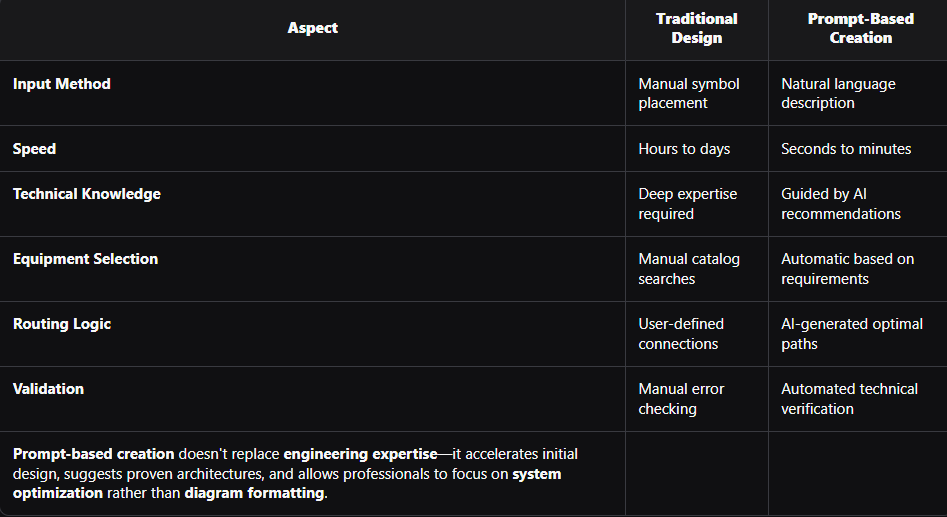
How Prompt-Based Creation Differs from Traditional Methods:
What Are the Key Technologies Behind Prompt-Based Systems?
Understanding the underlying technologies helps AV professionals maximize prompt-based tools and evaluate platform capabilities:
1. Large Language Models (LLMs)
Modern AI platforms use transformer-based neural networks trained on:
- AV industry documentation (white papers, installation guides)
- Technical specifications from manufacturers
- Design patterns from thousands of completed projects
- Audio engineering textbooks and training materials
These language models understand context—distinguishing between "wireless microphone system" (RF transmission) and "wireless presentation system" (HDMI connectivity).
2. Computer Vision for Diagram Generation
AI systems employ image generation algorithms that:
- Place symbols according to signal flow conventions (left to right, top to bottom)
- Route connection lines avoiding overlaps and maintaining clarity
- Apply spacing rules for professional diagram appearance
- Generate legends and annotations automatically
3. Rule-Based Expert Systems
AI engines combine machine learning with explicit engineering rules:
- Signal compatibility checks (analog vs digital, balanced vs unbalanced)
- Power calculations (amplifier output vs speaker loads)
- Network bandwidth validation (Dante stream counts, switch capacity)
- Code compliance (fire alarm integration, emergency systems)
4. Semantic Understanding of AV Terminology
NLP systems recognize industry-specific language:
- Brand names and product families (Q-SYS Core, ULXD wireless)
- Technical abbreviations (DSP, DAW, I/O, SPL, PoE)
- Installation contexts (proscenium, thrust stage, sanctuary, boardroom)
- Functional requirements (voice lift, confidence monitoring, assistive listening)
This semantic awareness enables accurate interpretation of complex prompts like "Design a 300-seat performing arts center with orchestral shell compatibility, wireless IEM for performers, and ADA-compliant assistive listening."
Key Features That Enable Effective Prompt-Based Creation
Professional prompt-based signal flow graph generator tools incorporate specific capabilities:
1. Contextual Prompt Refinement
Advanced platforms offer iterative prompt enhancement:
- Initial prompt: "Corporate boardroom audio"
- AI clarification: "How many seats? Wireless mics needed? Video conferencing?"
- Refined prompt: "12-person boardroom with 4 wireless mics and Zoom integration"
- Generated system matches specified requirements
2. Multi-Level Design Granularity
AI systems generate diagrams at varying detail levels:
- Conceptual: High-level system blocks (Input → Processing → Output)
- Logical: Device categories with quantities (8x Wireless Mics → DSP → 4x Ceiling Speakers)
- Physical: Specific models with part numbers (Shure ULXD4Q → QSC Core 110f → JBL Control 26CT)
Users specify desired detail level in prompts or refine generated diagrams progressively.
3. Component Substitution Intelligence
When AI-selected equipment doesn't meet project constraints (budget, availability, brand preferences), prompt-based tools support:
- "Replace QSC processors with Biamp Tesira"
- "Reduce total cost by 20% while maintaining performance"
- "Use only equipment from approved vendor list"
AI engines regenerate diagrams with substitutions validated for compatibility.
4. Zone and Room Awareness
Complex facilities require spatial organization:
- "Auditorium with 8 zones, each with independent level control"
- "Campus with main sanctuary plus 3 overflow rooms"
- AI generates multi-zone architecture with appropriate DSP routing and amplifier distribution
5. Standards and Code Compliance
Prompt-based systems enforce:
- ADA requirements for assistive listening coverage
- Fire code mandates for emergency announcement integration
- Network security standards for IT infrastructure
- Manufacturer specifications for proper equipment application
Benefits of Prompt-Based Diagram Creation for AV Professionals
For System Integrators:
Accelerated Preliminary Design: Generate initial system concepts in minutes during client discovery meetings—impressing prospects with immediate technical visualization of proposed solutions.Reduced Junior Designer Training Time: New engineers produce competent diagrams using AI guidance rather than requiring years of experience—scaling design capacity without proportional hiring.Consistent Design Quality: AI-generated architectures follow proven patterns and best practices—eliminating amateur mistakes like improper gain staging or unbalanced signal routing.Competitive Proposal Speed: Respond to RFPs and bid requests faster than competitors still using manual design methods—winning time-sensitive projects through rapid turnaround.
For Consultants:
Exploration of Multiple Architectures: Quickly generate alternative designs comparing centralized vs distributed processing, analog vs digital infrastructure, or different manufacturer ecosystems—presenting clients with informed options.Documentation Efficiency: AI-generated diagrams include proper labeling conventions, signal flow direction indicators, and professional formatting—meeting deliverable standards without extensive post-generation cleanup.Knowledge Preservation: Prompt libraries capture organizational expertise—junior staff access proven design patterns through standardized prompts rather than reinventing approaches.
For AV Design Teams:
Focus on Optimization, Not Layout: Engineers spend time on system tuning, acoustic considerations, and integration challenges rather than symbol placement and line routing—applying expertise where it matters most.Rapid Iteration: Client feedback ("Add recording capability" or "Support simultaneous translation") translates to prompt modifications generating updated diagrams instantly—eliminating hours of manual rework.Cross-Training Efficiency: Sales engineers and project managers create basic diagrams using prompts—reducing bottlenecks waiting for dedicated design resources.
Step-by-Step: How Prompt-Based Diagram Creation Works
Phase 1: Initial Requirement Capture
Step 1: AV professional opens prompt-based signal flow graph generator tool (like XTEN-AV X-DRAW) and initiates new project.Step 2: User enters natural language description in prompt interface:Example Prompt: "Design a conference room audio system for 20 people with ceiling microphones, HDMI audio de-embedding from video system, Dante networking, and USB conferencing interface for Microsoft Teams. Include distributed ceiling speakers with 4 zones and touchpanel control."Step 3: AI engine parses prompt, identifying:
- Space type: Conference room
- Capacity: 20 people
- Input sources: Ceiling mics, HDMI de-embedding, USB conferencing
- Network protocol: Dante
- Output distribution: Ceiling speakers, 4 zones
- Control interface: Touchpanel
Phase 2: AI-Assisted Design Generation
Step 4: Platform queries user for clarifications if needed:
- "Preferred DSP manufacturer?"
- "Microphone coverage pattern preference?"
- "Budget constraints?"
Step 5: AI system selects appropriate equipment from smart product library:
- Ceiling microphones: Shure MXA910 (quantity: 2, based on room size)
- DSP: QSC Core 110f (Dante-enabled, suitable capacity)
- HDMI de-embedder: Extron DTP HDMI 4K 230 Rx
- Amplifier: QSC SPA4-100 (4-channel, network-connected)
- Speakers: QSC AD-C820 ceiling speakers (8 units for coverage)
- USB interface: QSC UFC-1 for Teams integration
- Control: QSC TSC-7t touchscreen
Step 6: AI-assisted auto symbol placement arranges devices following signal flow logic:
- Inputs (left): Microphones, HDMI, USB
- Processing (center): DSP with internal routing visualization
- Distribution (right): Amplifiers and speakers organized by zones
- Control (bottom): Touchpanel with control connections
Step 7: Intelligent cable & connection estimation adds:
- Dante network connections between compatible devices
- Analog/digital signals where network unavailable
- Control pathways from touchpanel to DSP
- Cable type recommendations based on distance and signal
Phase 3: Validation and Refinement
Step 8: Live validation & error alerts check:
- All signal sources reach outputs through valid paths
- Network bandwidth sufficient for Dante channel count
- Amplifier power appropriate for speaker loads
- Control interfaces properly configured
Step 9: User reviews AI-generated diagram and provides refinement prompts:
- "Add recording output from DSP"
- "Change ceiling speakers to JBL Control 26CT"
- "Include wireless presentation system integration"
Step 10: AI engine updates diagram based on refinements, maintaining technical validity and routing logic.
Phase 4: Documentation Generation
Step 11: Platform produces auto-generated Bill of Materials (BOM) with:
- Equipment list with manufacturer part numbers and quantities
- Cable specifications with types and estimated lengths
- Accessory requirements (rack shelves, mounting hardware)
Step 12: User exports deliverables:
- PDF signal flow diagram for client presentations
- Exportable BOM (Excel/CSV) for procurement
- Signal path trace reports documenting routing logic
- Project summary PDFs for installation teams
Phase 5: Collaborative Review
Step 13: Version history & collaboration features enable:
- Sharing designs with project stakeholders
- Tracking changes through revision cycles
- Managing client approval workflows
Step 14: Final approved design transfers to installation documentation and procurement systems through integration with proposal & procurement workflows.
Comparison: Manual vs. Template-Based vs. Prompt-Based Design
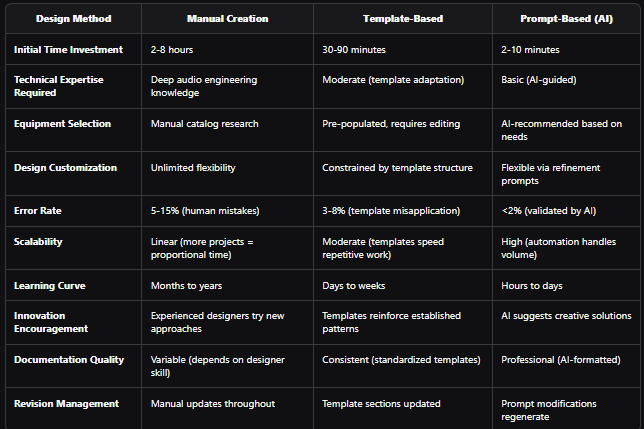
Real-World Scenario Comparison:
Project: 150-seat corporate training center with simultaneous interpretation, recording, and videoconferencingManual Approach:
- Senior engineer spends 6 hours designing signal flow
- 2 hours creating diagram in Visio
- 2 hours compiling BOM
- 1 hour reviewing and correcting errors
- Total: 11 hours, senior resource required
Template Approach:
- Engineer selects "Corporate Training Room" template
- 1.5 hours adapting for interpretation booths
- 45 minutes adjusting equipment for 150 capacity
- 1 hour adding recording and videoconferencing
- 30 minutes BOM updates
- Total: 3.75 hours, moderate experience required
Prompt-Based Approach (XTEN-AV X-DRAW):
- Engineer enters detailed prompt describing all requirements
- 5 minutes for AI generation
- 20 minutes reviewing and refining with additional prompts
- 10 minutes exporting documentation
- Total: 35 minutes, junior engineer capable
ROI: 96% time savings vs. manual, 91% vs. template—with comparable or superior accuracy.
XTEN-AV X-DRAW: The Industry's Leading Prompt-Based Signal Flow Graph Generator Tool
XTEN-AV X-DRAW pioneered AI-assisted audio system design and remains the most sophisticated prompt-based signal flow graph generator tool available to AV professionals.
Key Features That Make XTEN-AV Signal Flow Graph Generator Tool Stand Out
AI-Assisted Auto Symbol Placement
XTEN-AV uses AI-powered logic to automatically place and align symbols based on signal flow rules, eliminating manual layout work and ensuring professional, readable diagrams every time. The machine learning models understand audio engineering conventions—placing input sources left, processing center, outputs right, with appropriate spacing and alignment.
Smart Product Library With Real-World SKUs
Unlike generic diagram tools, XTEN-AV includes an extensive manufacturer-verified library with real model numbers, SKUs, and technical attributes—so components in your diagram are actual products, not placeholders. The AI recommendation engine selects equipment matching performance requirements and budget constraints from this comprehensive database.
Auto-Generated Bill of Materials (BOM)
As you build the signal flow (or as AI generates it from prompts), XTEN-AV dynamically generates a detailed BOM with quantities, part numbers, and descriptions. This accelerates costing and procurement without needing spreadsheet exports—critical for rapid proposal development following prompt-based design.
Intelligent Cable & Connection Estimation
XTEN-AV recognizes signal types and connection patterns, automatically estimating cable counts and suggesting appropriate cable types instead of leaving users to guess or manually calculate. Prompt-based designs include complete infrastructure requirements, not just equipment.
Metadata Tagging for Rooms & Zones
Assign rooms, zones, or rack locations to each component, so diagrams double as functional system documentation—ideal for multi-room venues, auditoriums, campuses, and large estates. Prompt descriptions mentioning zones automatically organize AI-generated architectures accordingly.
Live Validation & Error Alerts
The tool checks signal paths for logical errors (e.g., unconnected outputs, incompatible interfaces) and flags issues as you work—cutting down on costly design revisions later. AI-generated designs undergo automatic technical validation before presentation, ensuring client-ready quality.
Exportable Reports & Documentation
Produce professional deliverables like:
- Exportable BOM (Excel/CSV) for procurement integration
- Signal Path Trace Reports documenting complete audio routing
- Project Summary PDFs for client presentations
…without switching tools. Prompt-based workflows generate complete documentation packages in single operations.
Integration With Proposal & Procurement Workflows
XTEN-AV's data output can plug into budgeting, proposal, and procurement processes, reducing manual re-entry and improving consistency from design to purchase order. AI-generated BOMs feed directly into D-Tools, Xchange, and other AV business platforms.
Customizable Symbols & Templates
Design teams can extend or customize symbol sets and templates to match corporate standards or unique system requirements, ensuring consistency across projects. AI engines learn from custom libraries, suggesting organization-preferred equipment in prompt responses.
AI-Driven Component Recommendations
The platform can suggest compatible hardware (e.g., DSPs, amplifiers, mic preamps) based on signal requirements and system context, helping avoid mismatches and under-spec'd designs. Natural language prompts trigger intelligent equipment selection from thousands of possible combinations.
Version History & Collaboration
Track changes over time, manage project revisions, and collaborate with teammates in real time—important for distributed AV design teams and multi-stakeholder reviews. Prompt history captures design evolution, enabling rollback or alternative exploration.
AI and Future Trends in Prompt-Based Signal Flow Design
The convergence of generative AI, audio engineering expertise, and cloud computing promises transformative enhancements:
Emerging Capabilities:
1. Multimodal Prompt InputFuture systems will accept:
- Voice commands: Speak system requirements during client meetings
- Sketches and photos: Upload room drawings; AI generates appropriate designs
- Reference examples: "Design something like the auditorium we did last year, but larger"
2. Predictive System OptimizationAI engines will analyze:
- Acoustic modeling data (room dimensions, surface materials)
- Usage patterns (calendar integration showing event types)
- Environmental factors (ambient noise, occupancy variations)
…and recommend system configurations optimized for actual performance rather than generic specifications.3. Autonomous Design IterationAI agents will:
- Generate multiple alternative architectures from single prompt
- Score designs against cost, performance, reliability, maintainability
- Present ranked options with comparative analysis
Engineers select preferred approach or request hybrid combinations.4. Real-Time Code Compliance VerificationAI systems will automatically:
- Check designs against local building codes
- Verify ADA compliance for assistive listening
- Validate fire alarm integration requirements
- Flag electrical code violations in power distribution
5. Conversational Design RefinementRather than isolated prompts, AI platforms will support:
- Ongoing dialogue: "That looks good, but can we reduce cost?" → AI suggests alternatives
- Contextual memory: "Use the same DSP platform as the boardroom project"
- Clarifying questions: "Should recording be multi-track or stereo mix?"
6. Integration with Building Information Modeling (BIM)Prompt-based tools will:
- Import Revit or AutoCAD architectural models
- Automatically place equipment in 3D space
- Generate signal flow diagrams respecting physical constraints
- Export coordinated designs to construction documentation
Long-Term Vision:
Autonomous AV System Design: Clients describe needs in natural language → AI generates complete technical documentation, proposals, installation drawings, and commissioning plans → Human experts review and approve → System ships for installation.Engineers transition from diagram creators to design validators and system optimizers—focusing expertise on complex challenges while AI handles routine design work.
Stop AV Design Errors: Best Prompt-Based Signal Flow Tools for 2026
As AI-powered design matures, selecting the right prompt-based signal flow graph generator tool requires evaluating:
Critical Capabilities Checklist:
✅ Natural language understanding accurately interpreting AV terminology and technical requirements
✅ Comprehensive equipment libraries with current manufacturer products and specifications
✅ Validated audio engineering rules ensuring generated designs follow industry best practices
✅ Intelligent equipment selection balancing performance, cost, and compatibility
✅ Professional diagram formatting producing client-ready visualizations without manual cleanup
✅ Automated validation catching technical errors before human review
✅ Flexible refinement workflows supporting iterative improvement through additional prompts
✅ Complete documentation generation including BOMs, cable schedules, and specification reports
✅ Business system integration exporting to proposal tools, procurement platforms, project management
✅ Collaboration infrastructure enabling team review and version control
Platform Selection Guidelines:
Adopt prompt-based tools if:
- Design volume justifies automation investment
- Speed to proposal is competitive differentiator
- Junior designers need AI guidance for complex systems
- Consistency and quality control are organizational priorities
- Client expectations demand rapid preliminary design during meetings
Stick with traditional methods if:
- Projects are extremely unique, requiring custom approaches
- Regulatory environments prohibit AI-assisted design
- Team expertise already delivers adequate speed and quality
- Client relationships require demonstrable human design involvement
For most AV businesses, prompt-based capabilities represent competitive advantage—the question isn't "should we adopt?" but "which platform delivers maximum value?"
FAQ Section: Prompt-Based Audio Signal Flow Diagram Creation
Q1: Does prompt-based design replace human AV engineers?
A: No—prompt-based tools augment engineering expertise, not replace it. AI generates initial designs following proven patterns; human engineers validate technical accuracy, optimize for site-specific conditions, and ensure client requirements are fully met. Think of AI as an experienced assistant producing first drafts that experts refine.
Q2: How accurate are AI-generated signal flow diagrams?
A: Leading platforms like XTEN-AV X-DRAW achieve 95-98% technical accuracy on standard systems (conference rooms, auditoriums, houses of worship). Complex specialized applications (broadcast facilities, recording studios) may require more human refinement. Accuracy improves as AI models learn from more projects and engineering feedback.
Q3: What happens if the AI selects equipment I don't have access to or prefer not to use?
A: Professional prompt-based tools support refinement prompts like "Replace all QSC equipment with Biamp alternatives" or "Use only products from approved vendor list." AI engines regenerate designs respecting constraints while maintaining technical validity and system functionality.
Q4: Can prompt-based tools handle multi-room or campus-scale projects?
A: Yes—advanced platforms support complex spatial descriptions in prompts: "Design audio for a performing arts center with 800-seat main auditorium, 200-seat black box theater, and 3 rehearsal rooms, all sharing Dante network." AI generates appropriate multi-zone architectures, network topology, and equipment distribution.
Q5: How do I write effective prompts for signal flow generation?
A: Best practices include:
- Specify space type and capacity (50-seat boardroom, 500-seat auditorium)
- List input sources (wireless mics, HDMI, streaming, playback)
- Describe outputs (distributed speakers, recording, broadcast feed)
- Mention protocols (Dante, AVB, CobraNet)
- State constraints (budget, manufacturer preferences, existing infrastructure)
AI platforms typically provide prompt templates and guided workflows for common system types.
Q6: Does prompt-based creation work offline, or require cloud connectivity?
A: Most AI-powered design tools currently require internet connectivity to access cloud-based language models and equipment databases. Some platforms offer hybrid modes: basic template-based design works offline, while advanced AI features need cloud access. As AI technology matures, more local processing options will emerge.
Q7: How do prompt-based tools handle custom or specialized equipment?
A: Professional platforms allow custom library additions—add specialized devices with specifications, I/O configurations, and technical attributes. AI engines then include custom equipment in generated designs when appropriate. Some systems support prompts like "Include custom 32-channel Dante stage box, part number XYZ-123."
Q8: Can I trust AI-generated designs for mission-critical installations?
A: AI-generated designs should always undergo expert validation for critical applications (emergency systems, life safety, high-stakes events). Use prompt-based tools to accelerate initial design and explore alternatives, but apply senior engineering review before finalizing mission-critical systems. Most integrators establish quality control workflows where junior engineers use AI, senior staff validate.
Conclusion: Key Takeaways for AV Professionals
Prompt-based audio signal flow diagram creation represents the most significant design workflow innovation in the AV industry since the transition from paper drafting to CAD software. By leveraging artificial intelligence, natural language processing, and audio engineering knowledge bases, modern platforms transform system design from multi-hour manual processes into minutes-long AI-assisted workflows.
Critical Success Factors:
✅ Embrace AI augmentation—prompt-based tools amplify expertise, enabling faster, more consistent design without replacing engineering judgment
✅ Invest in platforms with deep audio knowledge—generic AI tools lack AV-specific understanding; choose specialized signal flow graph generator tools like XTEN-AV X-DRAW
✅ Develop prompt engineering skills—learning to write effective natural language descriptions maximizes AI-generated design quality
✅ Establish validation workflows—AI output should undergo expert review, especially for complex or critical systems
✅ Integrate with business systems—prompt-based design delivers maximum value when connected to proposal, procurement, and project management platforms
✅ Train teams progressively—introduce prompt-based methods for simple projects, expand to complex systems as confidence builds
✅ Measure efficiency gains—track design time, error rates, and proposal turnaround to quantify ROI and justify platform investment
The XTEN-AV X-DRAW Advantage:
For AV integrators and consultants seeking competitive edge through design automation, XTEN-AV X-DRAW delivers the industry's most advanced prompt-based signal flow graph generator tool. Its AI-assisted auto symbol placement, smart product library, intelligent component recommendations, and comprehensive documentation generation transform how AV professionals approach system design.Manual signal flow creation consumes valuable engineering capacity and limits project volume scalability. Template-based methods improve efficiency but constrain creativity. Prompt-based AI design offers unprecedented speed while maintaining technical accuracy and enabling unlimited customization the best of all approaches.
The future of AV design is conversational: describe what you need, let AI generate technically sound solutions, refine with additional prompts, validate with expert knowledge. Early adopters gain years of competitive advantage over firms clinging to traditional methods.
Design smarter. Move faster. Win more projects. powered by prompt-based audio signal flow diagram creation and the best signal flow graph generator tool in the industry.