
How do you build a scalable AV network that supports multi-room audio video systems today while accommodating growth tomorrow? The answer: Design a hierarchical network architecture with proper VLAN segmentation, implement managed switches with adequate PoE capacity and bandwidth, use structured cabling that supports 10 Gbps, deploy centralized management platforms, and plan IP addressing schemes that accommodate 200-300% growth—creating infrastructure that seamlessly scales from 5 rooms to 500 without requiring complete redesign.
Building scalable multi-room AV networks shares fundamental principles with residential installations but requires enterprise-level planning. Just as a well-designed ethernet house wiring diagram documents every connection point, cable run, and switch location in home networking, commercial AV network design demands comprehensive documentation of network topology, VLAN assignments, bandwidth allocation, and equipment specifications supporting current needs while enabling future expansion. Understanding Home Network Wiring concepts—including structured cabling standards, switch hierarchies, traffic segmentation, and proper termination techniques—provides the foundational knowledge for building professional AV infrastructure that scales efficiently without costly rework.
For AV integrators, system designers, and technology consultants deploying multi-room video distribution, whole-building audio, or unified collaboration platforms, scalability isn't optional—it's the difference between profitable, future-proof installations and expensive do-overs. This guide provides proven strategies for building AV networks that grow with your clients' needs.
Key Takeaways
- Scalable AV networks require hierarchical three-tier architecture (access, distribution, core) supporting growth without redesign
- Proper VLAN segmentation separating video, audio, control, and management traffic prevents performance bottlenecks
- Bandwidth planning must account for peak simultaneous usage plus 100-200% growth buffer
- Managed switches with PoE++, IGMP snooping, and QoS are non-negotiable for professional multi-room AV
- Cat6a cabling minimum (10GBASE-T support) future-proofs infrastructure for 10+ years
- IP addressing schemes should allocate room for 3-5x current device count
- Centralized management platforms simplify administration as systems scale beyond 10-20 rooms
- Modular design enables incremental expansion without disrupting operational rooms
- Documentation including network diagrams and configuration standards is critical for scalability
- AI-powered automation dramatically simplifies management of large-scale multi-room systems
What Is a Multi-Room AV Network Setup?
A multi-room AV network setup is an IP-based infrastructure that distributes audio signals, video content, and control data to multiple rooms or zones throughout a building using converged Ethernet networking rather than traditional dedicated AV cabling—enabling any source to reach any destination through software-defined routing.
Core Components
Network Infrastructure:
- Managed Ethernet switches with VLAN, QoS, and multicast support
- Structured cabling (Cat6a or fiber) connecting all rooms
- PoE capability powering endpoints without separate electrical
- Centralized routing for inter-VLAN communication
AV Endpoints:
- Video encoders converting HDMI/SDI to IP streams
- Video decoders outputting to displays in each room
- Audio-over-IP devices (Dante, AES67) for distributed audio
- Wireless presentation gateways for BYOD collaboration
- Control processors managing room automation
Management Layer:
- Control systems (Crestron, Extron, AMX) providing user interfaces
- Network management software monitoring infrastructure health
- Configuration management ensuring consistency across rooms
Scale Characteristics
Small Multi-Room (5-20 Rooms):
- Single building or floor
- 20-80 AV endpoints
- 1-3 network switches
- Simplified management
Medium Multi-Room (20-100 Rooms):
- Multiple floors or buildings
- 100-400 endpoints
- 5-15 switches in hierarchical topology
- Requires dedicated IT/AV coordination
Large Multi-Room (100+ Rooms):
- Campus or multi-site deployments
- 500-2,000+ endpoints
- Dozens of switches across three-tier architecture
- Enterprise-class management and automation essential
Why Scalability Matters in AV Network Design
The Cost of Non-Scalable Design
Initial Under-Design: When AV networks lack scalability:
Technical Limitations:
- Bandwidth exhaustion: Trunk links saturated, causing video quality degradation
- Switch port depletion: No capacity for additional rooms
- IP address exhaustion: Subnet too small for growth
- VLAN sprawl: Poor initial design creates management nightmare
- Performance bottlenecks: Oversubscribed uplinks degrading all traffic
Financial Impact:
- Complete rework costs: 2-3× original installation expense
- Downtime costs: Existing rooms offline during infrastructure replacement
- Reputation damage: Failed expansion projects harm integrator credibility
- Lost opportunities: Unable to bid on expansion projects
Real-World Example:
Initial Installation (20 rooms, 2023):
- Cost: $200K
- 2 × 48-port 1 Gbps switches
- Cat6 cabling
- /24 subnet (254 addresses)
Expansion Need (40 rooms, 2025):
Non-Scalable Approach:
- Switches at capacity, trunks saturated
- Cabling inadequate for 4K video
- IP addressing exhausted
- Rework cost: $150K + 2 weeks downtime
Scalable Approach (if designed correctly):
- Add 1 switch, connect to existing infrastructure
- Cat6a cabling supports current and future needs
- /22 subnet allocated (1,022 addresses)
- Expansion cost: $40K + 2 days installation
- Savings: $110K + minimal disruption
Business Benefits of Scalability
Client Satisfaction:
- Future-proof investment: Clients appreciate infrastructure that grows with needs
- Lower TCO: Avoid expensive rework for expansions
- Faster expansions: Add rooms in days instead of months
- Predictable costs: Modular growth with known pricing
Integrator Advantages:
- Recurring revenue: Natural upgrade path as clients expand
- Competitive differentiation: Expertise in scalable design wins projects
- Reduced callbacks: Fewer performance issues as systems grow
- Operational efficiency: Standardized designs deployed repeatedly
Key Components of a Scalable AV Network Setup
Network Switches: The Foundation
Access Layer Switches:
Minimum Specifications:
- Port count: 24 or 48 ports (balance capacity vs management)
- PoE++: 802.3bt (60-100W per port) for high-power AV devices
- PoE budget: 740W minimum (24-port), 1440W (48-port)
- Uplinks: Dual 10 Gbps SFP+ for growth and redundancy
- Features: IGMP snooping, 802.1Q VLANs, QoS (802.1p/DSCP)
- Management: Web, CLI (SSH), SNMP v3, RESTful API
Recommended Models (2026):
- Cisco Catalyst 1000/9200 series
- Aruba CX 6200/6300 series
- UniFi Pro Max switches (cost-effective for smaller deployments)
- Netgear M4250/M4300 (AV-focused features)
Distribution/Core Switches: (Required for 50+ rooms)
Specifications:
- 10 Gbps ports for aggregating access switches
- 40 Gbps uplinks between distribution and core
- Layer 3 routing for inter-VLAN communication
- Redundancy: Stacking or chassis-based for high availability
- PIM sparse mode: Multicast routing capabilities
Structured Cabling Infrastructure
Copper Cabling Standards:
Cat6a (Recommended Minimum):
- Bandwidth: 500 MHz
- Speed: 10GBASE-T to 100 meters
- PoE: Supports PoE++ without heat concerns
- Cost: Moderate premium over Cat6 (15-20%)
- Future-proofing: Adequate for 10-15 years
- Use case: Standard for all multi-room AV
Cat6 (Acceptable for Budget Projects):
- Limitation: 10GBASE-T only to 55 meters
- Risk: May require upgrade for 4K+ video in 5-7 years
- Recommendation: Only if budget prohibits Cat6a
Fiber Optic (Building-to-Building):
- Single-mode: 10+ km distances
- Multimode OM4: 550m at 10 Gbps
- Use case: Campus backbones, long runs exceeding 100m
Installation Best Practices:
- Home run topology: All rooms back to central IDF/MDF
- Proper termination: TIA-568-B standards, certified testing
- Cable management: Organized pathways, comprehensive labeling
- Spare capacity: 30% extra pathways for future cables
- Testing: Fluke DTX/DSX certification for every link
IP Addressing and VLAN Design
Scalable IP Addressing:
Good Practice:
Initial 20 Rooms, Plan for 100:
Allocate /22 subnet (1,022 usable IPs):
10.100.0.0/22
Subdivide by function:
- Video devices: 10.100.0.0/24 (254 IPs)
- Audio devices: 10.100.1.0/24 (254 IPs)
- Control systems: 10.100.2.0/24 (254 IPs)
- Management: 10.100.3.0/24 (254 IPs)
Room for growth: Each VLAN can expand 10-15× before exhaustion
Poor Practice:
/24 subnet for all devices: 10.100.1.0/24
- Exhausted at 254 devices (~50 rooms)
- Requires renumbering entire network to expand
- Causes downtime and configuration headaches
VLAN Strategy:
Functional Segmentation:
VLAN Design for Scalability:
VLAN 100: AV-VIDEO (Encoders, decoders)
- Subnet: 10.100.0.0/24
- QoS: High priority (DSCP 34)
VLAN 110: AV-AUDIO (Dante, AES67 devices)
- Subnet: 10.100.1.0/24
- QoS: Highest priority (DSCP 46)
- PTP enabled for synchronization
VLAN 120: AV-CONTROL (Processors, panels)
- Subnet: 10.100.2.0/24
- QoS: Medium priority (DSCP 26)
VLAN 130: AV-MANAGEMENT (Monitoring, firmware)
- Subnet: 10.100.3.0/24
- QoS: Low priority (DSCP 0)
VLAN 999: NATIVE-UNUSED (Trunk security)
- Not routed
AV-over-IP Technology Selection
Technology Comparison:
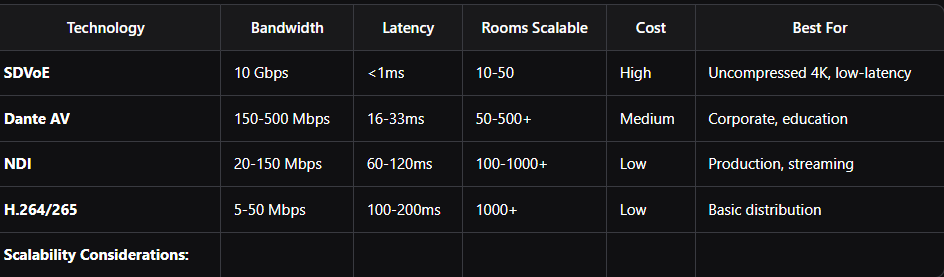
SDVoE (Uncompressed):
- Pro: Zero latency, pristine quality
- Con: Requires dedicated 10 Gbps network infrastructure
- Scalability: Limited to 10-50 rooms economically
- Use case: Premium installations where quality and latency critical
Compressed IP (Dante AV, NDI):
- Pro: Works on 1 Gbps infrastructure, highly scalable
- Con: Slight compression artifacts, moderate latency
- Scalability: 50-1,000+ rooms feasible
- Use case: 90% of multi-room commercial AV
Centralized Management Platforms
Essential for 20+ Rooms:
AV Management Systems:
- Crestron Fusion: Monitoring, room scheduling, analytics
- Extron GlobalViewer Enterprise: Device management, firmware updates
- Q-SYS Reflect: Cloud-based Q-SYS management
- AMX RMS: Asset management and monitoring
Network Management:
- UniFi Controller: Unified management for UniFi infrastructure
- Cisco DNA Center: Enterprise network orchestration
- SolarWinds NPM: Comprehensive monitoring and alerting
Benefits:
- Centralized visibility: Single dashboard for all rooms
- Bulk configuration: Update 100 rooms as easily as 1
- Proactive alerts: Detect issues before users complain
- Usage analytics: Data-driven decisions on expansion
- Remote troubleshooting: Fix issues without truck rolls
Step-by-Step Guide to Building a Scalable AV Network
Step 1: Requirements Gathering and Future Planning
Current State Assessment:
Questions to Answer:
Current Needs:
- How many rooms today? (e.g., 20 rooms)
- What AV services? (Video conferencing, digital signage, audio)
- Bandwidth per room? (Calculate: 50-100 Mbps typical)
- User count? (Peak simultaneous users)
Growth Projections:
- Rooms in 2 years? 5 years? (e.g., 40 rooms, 100 rooms)
- New services planned? (4K video, immersive audio, recording)
- Building expansions? (New wings, floors, buildings)
- Technology trends? (8K, XR, AI processing)
Budget Considerations:
- Initial budget vs. expansion budgets
- Acceptable cost-per-room for scalability
- Infrastructure refresh cycles (5-7 years typical)
Design for 3-5× Current Scale: General rule: If deploying 20 rooms today, design infrastructure supporting 60-100 rooms.
Step 2: Network Topology Design
Hierarchical Architecture:
Small Scale (5-20 Rooms):
Topology: Collapsed Core/Distribution
[Internet Router]
|
[Core Switch] (24-48 port, Layer 3, 10G uplinks)
/ | \
Room1 Room2 Room3... (Direct connect to core)
Characteristics:
- Simple, cost-effective
- Single switch bottleneck (mitigate with redundant PSU)
- Adequate for single-building deployments
Medium Scale (20-100 Rooms):
Topology: Two-Tier (Access + Distribution/Core)
[Distribution/Core Switch] (48-port L3, 10G uplinks)
/ | \
[Access1] [Access2] [Access3] (24-48 port, PoE++)
/ \ / \ / \
Rooms Rooms Rooms
Characteristics:
- Access switches near room clusters (within 100m)
- Distribution switch centrally located (IDF/MDF)
- 10 Gbps uplinks prevent bottlenecks
- Easy to add access switches for expansion
Large Scale (100+ Rooms):
Topology: Three-Tier (Access + Distribution + Core)
[Core Switch] (Chassis, 40-100 Gbps)
/ \
[Dist-Bldg1] [Dist-Bldg2] (10-40 Gbps)
/ | \ / | \
[Access Switches...] [Access Switches...]
Characteristics:
- Core: High-speed backbone between buildings
- Distribution: Building or floor aggregation
- Access: Room connectivity
- Maximum scalability and redundancy
Step 3: Bandwidth Calculation and Capacity Planning
Per-Room Bandwidth:
Typical Multi-Room Conference Room:
Video Conferencing:
- Outbound: 4 Mbps (1080p30)
- Inbound: 12 Mbps (3 participants)
- Total: 16 Mbps
Wireless Presentation:
- Active presenter: 20 Mbps (1080p60)
AV-over-IP Distribution (if applicable):
- Compressed: 100 Mbps per stream
- Uncompressed: 3-10 Gbps per stream
Control and Management:
- Minimal: 1-2 Mbps
Total per Room: 40-150 Mbps (compressed)
3-10 Gbps (uncompressed)
Aggregate Calculation:
50-Room Deployment Example:
Assumptions:
- 50 rooms × 100 Mbps average
- 40% simultaneous peak usage
- 30% overhead/growth buffer
Peak Bandwidth:
50 × 100 Mbps × 0.4 = 2,000 Mbps (2 Gbps)
With buffer: 2.6 Gbps
Infrastructure Requirements:
- Access switches: 1 Gbps adequate per port
- Uplinks: 10 Gbps minimum (4-5× aggregate)
- Distribution-Core: 40 Gbps for future growth
Step 4: Switch Configuration for Scalability
VLAN Configuration:
Standard Switch Configuration Template:
! Create VLANs
vlan 100
name AV-VIDEO-DISTRIBUTION
vlan 110
name AV-AUDIO-DANTE
vlan 120
name AV-CONTROL-SYSTEMS
vlan 130
name AV-MANAGEMENT
vlan 999
name NATIVE-UNUSED
! Configure trunk ports (to distribution)
interface GigabitEthernet1/0/48
description UPLINK-TO-DISTRIBUTION
switchport mode trunk
switchport trunk native vlan 999
switchport trunk allowed vlan 100,110,120,130
channel-group 1 mode active
! Configure access ports (to endpoints)
interface range GigabitEthernet1/0/1-24
switchport mode access
switchport access vlan 100
spanning-tree portfast
power inline auto
QoS Configuration:
! Configure QoS for AV priority
class-map match-any AV-AUDIO
match dscp ef
class-map match-any AV-VIDEO
match dscp af41
policy-map AV-QOS
class AV-AUDIO
priority percent 20
class AV-VIDEO
bandwidth percent 40
class class-default
fair-queue
! Apply to all interfaces
interface range GigabitEthernet1/0/1-48
service-policy output AV-QOS
Step 5: Documentation for Long-Term Scalability
Essential Documentation:
Network Diagrams:
- Physical topology: All switches, cables, rooms
- Logical topology: VLANs, IP subnets, routing
- Rack elevations: Equipment placement and cabling
Configuration Standards:
- VLAN assignments: Which devices in which VLANs
- IP addressing scheme: Allocation per room/function
- Port naming conventions: Consistent descriptions
- QoS policies: Priority levels and bandwidth allocations
Device Inventory:
Spreadsheet Tracking:
Room | Device Type | Model | IP Address | MAC | Switch/Port | VLAN
-----|-------------|-------|------------|-----|-------------|------
CR101| Encoder | ENC-100| 10.100.0.10| AA:BB...| SW1/P12 | 100
CR101| Decoder | DEC-100| 10.100.0.11| CC:DD...| SW1/P13 | 100
CR101| Control | PRO-200| 10.100.2.10| EE:FF...| SW1/P14 | 120
Standard Operating Procedures:
- Adding new room: Step-by-step checklist
- Troubleshooting: Common issues and resolutions
- Expansion process: How to add switches, VLANs, capacity
Best Practices for Multi-Room AV Network Design
Best Practice 1: Plan for 3-5× Growth
Infrastructure Overprovisioning:
- Switch ports: Leave 40-50% unused initially
- Uplink capacity: 4-5× aggregate room bandwidth
- IP address space: Allocate /22 minimum (use /20 for 100+ rooms)
- Cable pathways: 30% spare capacity for future pulls
Best Practice 2: Standardize Room Designs
Room Type Templates:
Small Huddle Room (Standard):
- 1 × Display
- 1 × Video Decoder
- 1 × Audio Endpoint
- 1 × Wireless Gateway
- 1 × Control Panel
Total: 5 network ports, 75W PoE, 50 Mbps bandwidth
Medium Conference Room (Standard):
- 1-2 × Displays
- 1 × Video Codec
- 1 × Camera
- 1 × Audio Processor
- 1 × Wireless Gateway
- 1 × Control Processor
Total: 6-7 ports, 150W PoE, 100 Mbps bandwidth
Benefits:
- Faster deployments (replicate proven designs)
- Easier troubleshooting (familiar configurations)
- Simplified inventory management
- Predictable capacity planning
Best Practice 3: Implement Centralized Management Early
Management Platform Selection:
- Deploy management software from Day 1, even for 5 rooms
- Easier to manage 5 rooms consistently than retrofit for 50
- Centralized configuration changes scale to any room count
- Monitoring catches issues before they impact users
Best Practice 4: Use Modular Physical Design
Room Connectivity Modules:
- Wall-mounted AV boxes: Pre-wired connection points in each room
- Standardized cable counts: 6-12 drops per room depending on type
- Modular endpoints: Swap encoders/decoders without rewiring
- Service loops: Extra cable length for future device relocations
Best Practice 5: Automate Where Possible
Configuration Automation:
Ansible/Scripts for:
- VLAN creation across all switches
- QoS policy application
- Port configuration based on device type
- Bulk firmware updates
- Configuration backups
Benefits:
- 50 rooms configured as fast as 5
- Zero configuration errors from typos
- Version-controlled infrastructure
- Rapid disaster recovery
Common AV Network Setup Mistakes to Avoid
Mistake 1: Undersized Uplinks
Problem: Installing 1 Gbps uplinks when aggregating 24-48 rooms each requiring 50-100 Mbps.
Result: Uplink saturation causes quality degradation across ALL rooms during peak usage.
Solution: Use 10 Gbps uplinks minimum for access-to-distribution. Rule: Uplink should be 4-5× aggregate downstream bandwidth.
Mistake 2: Flat Network (No VLANs)
Problem: All devices in single VLAN/subnet.
Result:
- Broadcast storms affecting all devices
- No QoS differentiation between traffic types
- Security nightmare
- Troubleshooting complexity
Solution: Implement functional VLANs from Day 1 (video, audio, control, management).
Mistake 3: Inadequate IP Address Space
Problem: Allocating /24 subnet (254 addresses) for 20-room system.
Result: IP exhaustion at 50-60 rooms requiring complete network renumbering.
Solution: Allocate /22 minimum (1,022 addresses) or /20 (4,094 addresses) for large deployments.
Mistake 4: Forgetting IGMP Snooping
Problem: Not enabling IGMP snooping on switches.
Result: Multicast AV streams flood all switch ports, wasting bandwidth and overwhelming devices.
Solution: Enable IGMP snooping v2 or v3 on all VLANs carrying AV multicast.
Mistake 5: Poor Documentation
Problem: No network diagrams, IP address tracking, or configuration standards.
Result:
- 3× longer troubleshooting time
- Fear of making changes (might break unknown dependencies)
- Expansion projects become guesswork
- High turnover impact (knowledge walks out door)
Solution: Maintain comprehensive documentation from Day 1, update with every change.
Future Trends in Scalable AV Network Setup
Trend 1: AI-Powered Network Management
AI Capabilities (2026 and Beyond):
Predictive Maintenance:
- ML models analyzing device health metrics
- Failure prediction 30-90 days in advance
- Automatic ordering of replacement devices
- Proactive replacement during maintenance windows
Intelligent Optimization:
- Bandwidth allocation automatically adjusted based on usage patterns
- QoS policies dynamically updated for optimal performance
- Routing optimization selecting best paths in real-time
Automated Troubleshooting:
- Root cause analysis in seconds vs hours
- Self-healing: System automatically remediates common issues
- Virtual assistant: Natural language queries ("Why is Room 301 having video issues?")
Trend 2: Cloud-Managed Infrastructure
Hybrid Cloud Architectures:
- On-premises: Media processing (low latency required)
- Cloud: Configuration management, monitoring, analytics
- Benefits: Centralized management across multiple sites
- Scalability: Manage 1 room or 1,000 from single dashboard
Trend 3: WiFi 7 and Wireless AV
802.11be (WiFi 7):
- Bandwidth: Up to 30 Gbps theoretical
- Latency:
- Reliability: 99.9%+ for video streaming
Impact on Multi-Room AV:
- Wireless endpoints becoming viable (no cabling to rooms)
- Flexible room reconfigurations without rewiring
- Lower installation costs for certain deployment types
- Hybrid approach: Wired for critical rooms, wireless for flexible spaces
Trend 4: AV-IT-IoT Convergence
Unified Building Networks:
- Single infrastructure supporting AV, IT, IoT, building automation
- Shared management platforms across systems
- Data integration: AV analytics + occupancy sensors + HVAC optimization
- Cost efficiency: Shared network reduces overall infrastructure costs
Frequently Asked Questions
How many rooms can a single switch support?
24-48 rooms on a single 48-port PoE++ switch with 1 Gbps ports, assuming 1-2 devices per room and compressed AV-over-IP. For uncompressed SDVoE, 10-24 rooms per 48-port 10 Gbps switch. Always provide dual 10 Gbps uplinks regardless.
What's the minimum bandwidth per room for scalable AV?
50-100 Mbps per room for compressed video (1080p-4K), 3-10 Gbps for uncompressed 4K. Plan capacity for 40-50% simultaneous usage during peak times, plus 30% buffer for growth and overhead.
Should I use Cat6 or Cat6a for multi-room AV?
Cat6a is strongly recommended. While Cat6 costs 15-20% less, Cat6a supports 10GBASE-T to full 100 meters, is better for PoE++ (less heat), and future-proofs for 10-15 years. Cat6 may limit you to 4K compressed; Cat6a supports uncompressed 4K and future 8K.
How do I calculate total PoE budget needed?
List all PoE devices, sum their power draw (check specs), add 20% safety margin. Example: 24 rooms × 3 devices × 15W average = 1,080W; with margin = 1,300W. Select switch with adequate total PoE budget (1,440W for 48-port recommended).
What's the best VLAN strategy for multi-room AV?
Functional segmentation: Separate VLANs for video (VLAN 100), audio (VLAN 110), control (VLAN 120), management (VLAN 130). Enables targeted QoS policies, simplifies troubleshooting, improves security. Avoid room-based VLANs (creates management complexity).
When should I move from collapsed core to three-tier architecture?
Around 50-75 rooms or when spanning multiple buildings. Three-tier (access, distribution, core) provides scalability, redundancy, and performance for larger deployments. Below 50 rooms, two-tier (collapsed core/distribution) is usually sufficient and more cost-effective.
How much should I overprovision for scalability?
Infrastructure: Leave 40-50% of switch ports unused initially. Bandwidth: Design uplinks for 4-5× aggregate room bandwidth. IP addressing: Allocate 3-5× current device count IP space. Physical: Provide 30% spare conduit/pathway capacity. Better to over-provision infrastructure than under-provision.
Conclusion
Building scalable AV networks for multi-room systems demands strategic thinking beyond basic connectivity. The difference between systems that grow smoothly from 20 to 200 rooms versus those requiring expensive rework lies entirely in upfront design: hierarchical network topology, adequate bandwidth provisioning, proper VLAN segmentation, generous IP address allocation, quality cabling infrastructure, and comprehensive documentation. These aren't optional extras—they're essential foundations for future-proof installations.
For AV integrators and system designers, mastering scalable network architecture transforms project economics. Initial designs supporting 3-5× growth with minimal additional infrastructure cost create recurring revenue opportunities as clients naturally expand, while poorly designed systems become one-time projects with no upgrade path. The investment in proper planning—hierarchical topology, Cat6a cabling, managed switches with adequate PoE and uplinks, functional VLAN design—pays immediate returns through reduced troubleshooting, faster deployments, and satisfied clients who return for expansions.
AI-powered automation and cloud management platforms are revolutionizing how we deploy and manage multi-room AV networks at scale. What once required dedicated teams manually configuring hundreds of devices now happens through centralized platforms with intelligent optimization and predictive maintenance. Looking forward, WiFi 7, AV-IT-IoT convergence, and software-defined infrastructure will further simplify scaling from dozens to thousands of rooms while maintaining consistent performance.
The complexity of scalable AV networking is real, but so are the rewards. Organizations and integrators who master these principles—hierarchical design, adequate capacity, automation, comprehensive documentation—build infrastructure that adapts seamlessly to changing needs, emerging technologies, and business growth. Build your multi-room AV network with scalability as the primary design driver, and your infrastructure becomes not just adequate for today but exceptional for the next decade.