Houses of worship and large venues present some of the most complex challenges in audio visual equipment deployment, demanding systems that deliver exceptional speech intelligibility, support live music, accommodate diverse event types, and increasingly, enable broadcast-quality streaming to global audiences. In 2026, as congregations embrace hybrid worship models and venues host increasingly sophisticated productions, the importance of choosing the best audio visual equipment has never been more critical—poor technology decisions directly impact worship experiences, congregation engagement, volunteer frustration, and ultimately, the spiritual and community mission these spaces serve.
For AV integrators and system designers working with religious institutions and large venues, these projects require specialized knowledge: understanding acoustic challenges in reverberant spaces, selecting microphone systems that capture both spoken word and live instruments, deploying video systems visible across long viewing distances, and creating intuitive control interfaces that volunteer operators can manage confidently. This comprehensive guide examines the essential equipment categories, design considerations, and best practices for creating professional AV installations that serve these unique environments effectively.
Key Takeaways
- Houses of worship require specialized audio visual equipment balancing speech intelligibility, musical clarity, architectural sensitivity, and volunteer usability
- Speech intelligibility is the primary performance metric—target STI (Speech Transmission Index) above 0.65 in all seating areas
- Line array speaker systems provide superior coverage in large venues versus traditional point-source speakers
- Wireless microphone systems need 8-16+ channels for worship teams, choir, pastors, and guest speakers
- Large-format LED displays (10mm-6mm pixel pitch) work better than projection in bright worship spaces with high ambient light
- Live streaming requires dedicated camera operators or AI-powered PTZ cameras, video switchers, audio mixing, and streaming encoders
- Acoustic treatment is non-negotiable—untreated spaces waste investment in premium equipment through excessive reverberation
- Dante audio networking simplifies complex installations, reduces cabling costs, and provides flexibility for future expansion
- Volunteer-friendly control systems with preset scenes reduce training requirements and operational complexity
- Modular design allows phased implementation matching budget cycles and congregation growth
- Cloud-based management enables remote troubleshooting and preventive maintenance for multi-campus churches
- Accessibility compliance requires assistive listening systems, closed captioning, and sign language interpretation displays
What Is an AV System for Houses of Worship?
An AV system for houses of worship is an integrated collection of audio visual equipment designed to reinforce spoken messages, enhance musical worship, display visual content, broadcast services to overflow rooms and online audiences, and accommodate the unique acoustic, aesthetic, and operational requirements of religious facilities. Unlike commercial venues, worship AV systems must serve diverse purposes—from intimate prayer services to high-energy contemporary worship, theatrical productions to community events—all while respecting the architectural character and sacred nature of the space.
Core Functions of Worship AV Systems
Audio Reinforcement:
- Speech amplification ensuring pastoral messages heard clearly throughout sanctuary
- Musical performance support for worship bands, choirs, orchestras, and soloists
- Even coverage across all seating including balconies and side transepts
- Acoustic feedback elimination in challenging reverberant environments
Visual Presentation:
- Lyric display for congregational singing and responsive readings
- Sermon illustration through videos, images, and presentations
- Scripture display during readings and references
- Announcements and ministry information before and after services
Recording and Broadcasting:
- Service recording for archival and absent members
- Live streaming reaching homebound, remote, and online congregations
- Overflow room distribution for capacity events
- Multi-campus video venues for church networks
Specialized Capabilities:
- Assistive listening systems for hearing-impaired congregants
- Sign language interpreter camera feeds and displays
- Translation services for multilingual congregations
- Theatrical lighting for special services and performances
Essential AV Equipment for Houses of Worship and Large Venues
Audio Equipment Categories
Main Speaker SystemsProfessional sound reinforcement forms the foundation:
Line Array Systems:
- Vertical array of multiple speaker cabinets creating controlled coverage
- Superior throw reaching distant seating without over-amplifying front rows
- Precise directional control minimizing reflections off walls and ceilings
- Scalable for venues 500-5,000+ seats
Point-Source Systems:
- Traditional approach with left/right main speakers and fill speakers
- Cost-effective for smaller venues (under 500 seats)
- Simpler installation without rigging requirements
- Adequate performance in well-designed acoustical spaces
Distributed Systems:
- Multiple smaller speakers throughout venue
- Best for speech-only applications
- Minimal visual impact with ceiling-mounted discrete speakers
- Challenges with musical content requiring synchronized timing
Low-frequency reinforcement for contemporary worship:
Placement strategies:
- Front-loaded: Subwoofers at stage front (most common)
- End-fired arrays: Multiple subs creating directional bass
- Distributed: Multiple locations for smoother coverage
- Cardioid configuration: Reduced stage wash and rear wall reflections
Specifications:
- Frequency response: 30-120 Hz
- Powered vs. passive (powered preferred for flexibility)
- Quantity: 2-8+ depending on venue size and music style
Stage monitoring for musicians and speakers:
In-ear monitors (IEMs):
- Wireless personal monitoring systems
- Individual mix control for each performer
- Reduced stage volume improving house mix clarity
- Better feedback control
Floor wedges:
- Traditional stage monitors
- Budget-friendly for smaller worship teams
- Higher stage volume can cause feedback issues
- Coaxial designs improving clarity
Video Display Technology
LED Video WallsModern standard for worship environments:
Advantages:
- Extreme brightness (1,000-5,000+ nits) handling skylight and window lighting
- Seamless modular construction creating custom sizes
- Wide viewing angles (140°+) ensuring visibility from side seating
- Long lifespan (100,000+ hours)
- No maintenance (no lamps or filters)
Specifications:
- Pixel pitch: 3mm-10mm depending on viewing distance
- Indoor vs. outdoor rating (worship spaces require indoor)
- Viewing distance formula: Pixel pitch (mm) × 10 = minimum viewing distance (feet)
Example: 6mm pitch = 60 feet minimum, ideal for 60-200 feet
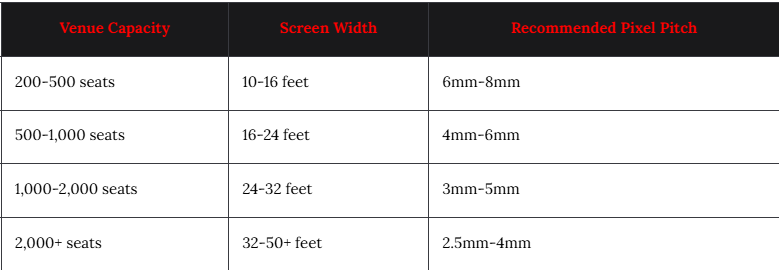
Sizing guidelines:
Still viable for specific applications:
When to use projection:
- Budget constraints (upfront cost lower than LED)
- Very large images (30+ feet wide)
- Temporary installations
- Complete light control available
Challenges:
- Ambient light washes out image
- Lamp replacement costs and maintenance
- Lower brightness versus LED (2,000-10,000 lumens typical)
- Color degradation over time
Laser projectors address some issues:
- 20,000-30,000 hour lifespan (no lamp changes)
- Higher brightness (10,000-30,000 lumens)
- Instant on/off (no warm-up)
- Higher cost ($10,000-$100,000+)
Microphone Systems
Wireless Handheld MicrophonesPrimary microphone for speakers and vocalists:
Specifications:
- UHF frequency (470-608 MHz in U.S., varies by country)
- Switchable capsules: Dynamic (SM58-style) for speaking, condenser for singing
- True diversity receivers preventing dropouts
- Rechargeable batteries with docking stations
Quantity needed:
- Minimum: 2 (pastor + backup)
- Typical: 4-6 (pastor, worship leader, soloists, guest speakers)
- Large venues: 8-12+ (multiple services, events)
Hands-free option for speakers:
Applications:
- Pastors who move frequently or gesture while speaking
- Theatrical productions requiring costume concealment
- Panel discussions and interviews
Considerations:
- Clothing noise can be problematic
- Omnidirectional pickup captures more ambient sound
- Visual appearance (some prefer hidden, others accept visibility)
Best speech intelligibility:
Advantages:
- Consistent positioning near mouth maintaining gain before feedback
- Superior audio quality versus lavalier
- Secure fit during energetic presentations
Ideal for:
- Contemporary worship leaders
- Youth services with active movement
- Fitness-style presentations
Capturing musical performances:
Choir microphones:
- Overhead boundary mics: 1 per 8-12 singers
- Hanging microphones: Positioned above choir area
- Wireless options: For processionals and special formations
Instrument microphones:
- Acoustic guitar: Small-diaphragm condenser clip-on
- Piano: Boundary or small condenser pair
- Drums: Full kit requires 8-12 microphones (kick, snare, toms, overheads, hi-hat)
- Brass/woodwinds: Dynamic or condenser as appropriate
Audio Mixing Consoles
Heart of the audio system:
Digital Mixing ConsolesModern standard for worship:
Advantages:
- Scene recall: Save complete mixes for different services
- Built-in effects: Reverb, delay, compression, EQ
- Multi-track recording: Capture all inputs to computer
- Remote mixing: Tablet control from anywhere in venue
- Network audio: Dante integration reducing cable runs
Popular models:
- Yamaha CL/QL series: Industry standard, reliable
- Allen & Heath dLive: Excellent sound quality, flexible
- Behringer X32: Budget-friendly, feature-rich
- PreSonus StudioLive: Good for churches with recording focus
Channel count:
- Small churches (under 300): 16-24 inputs
- Medium (300-800): 32-48 inputs
- Large (800+): 48-96+ inputs
Separate console for stage monitors:
Benefits:
- Independent control of stage mixes without affecting house
- Dedicated engineer focusing on performer needs
- Complexity management separating concerns
Required for:
- Venues with in-ear monitor systems (8+ mixes)
- Large worship teams (8+ musicians)
- Professional-level productions
Cameras for Video Production
PTZ Cameras (Pan-Tilt-Zoom)Versatile solution for worship:
Features:
- Remote control from video switcher or control system
- Preset positions (pulpit, choir, band, congregation)
- Smooth movement during services
- 4K resolution for broadcast quality
- NDI connectivity for network video
Typical camera positions:
- Camera 1: Center front, wide shot and speaker close-up
- Camera 2: Stage left, band/choir coverage
- Camera 3: Stage right, alternate angles
- Camera 4: Rear balcony, wide congregation shots
Camera count:
- Basic: 1-2 cameras with presets
- Standard: 3-4 cameras for varied shots
- Professional: 5-8+ cameras including specialty positions
Static positions with zoom-only:
Applications:
- Overflow rooms: Single wide shot sufficient
- Backup views: Secondary angles without operator
- Lobby displays: Showing service in progress
Video Production Equipment
Complete streaming setup requires:
Video Switcher:
- Multi-input switching between cameras and content
- Transitions (cuts, fades, wipes) between sources
- Picture-in-picture and split screens
- Graphics overlay (lower thirds, logos, verses)
- Popular models: Blackmagic ATEM, Roland V-series, TriCaster
Streaming Encoder:
- Hardware (dedicated appliance) or software (computer-based)
- Multi-platform streaming (Facebook, YouTube, church website simultaneously)
- Recording to local storage
- Closed captioning integration
Confidence Monitors:
- Stage displays showing lyrics and cues for worship team
- Production monitors for camera operators and director
- Lobby displays for overflow viewing
Control Systems
Simplified operation for volunteers:
Essential functions:
- System power on/off
- Source selection (computer, camera feeds, media player)
- Volume control (main, monitors, assistive listening)
- Preset scenes ("Sunday Service," "Youth Service," "Concert," "Meeting")
- Lighting control (if integrated)
Control options:
- Dedicated touch panels: Wall-mounted or tabletop (Crestron, Extron)
- Tablet apps: Using iPads or Android tablets
- Simple button panels: For basic operations
- Web-based: Access from any browser
How to Choose the Right Audio System for Worship Spaces
Acoustic Assessment First
Understand the space before specifying equipment:
Key measurements:
- Reverberation time (RT60): Measure decay of 1,000 Hz tone
- Target: 1.5-2.0 seconds for traditional liturgical, 1.0-1.5 seconds for contemporary
- Problem: RT60 over 3.0 seconds creates poor intelligibility regardless of equipment
Acoustic treatment strategy:
- Absorptive panels: Control mid-high frequency reflections
- Diffusion: Scatter sound reducing flutter echo
- Bass traps: Address low-frequency buildup
- Strategic placement: First reflection points, rear walls, parallel surfaces
Before/after testing:
- Measure STI (Speech Transmission Index) at multiple seating locations
- Target minimum STI 0.60, prefer 0.70+
- Document improvements justifying acoustic investment
Coverage Pattern Design
Map speaker coverage to seating areas:
Principles:
- Direct sound should dominate over reflections (3:1 ratio minimum)
- Overlapping coverage: Avoid dead spots between speakers
- Vertical aiming: Down-angle speakers keeping energy off ceiling
- Horizontal control: Minimize side wall reflections
Design tools:
- EASE (Enhanced Acoustic Simulator): Industry-standard acoustic modeling
- Manufacturer software: Meyer Sound MAPP, d&b ArrayCalc, L-Acoustics Soundvision
- Prediction accuracy: Modern software provides 90%+ accuracy
System Architecture Decisions
Analog vs. Digital vs. Network Audio:
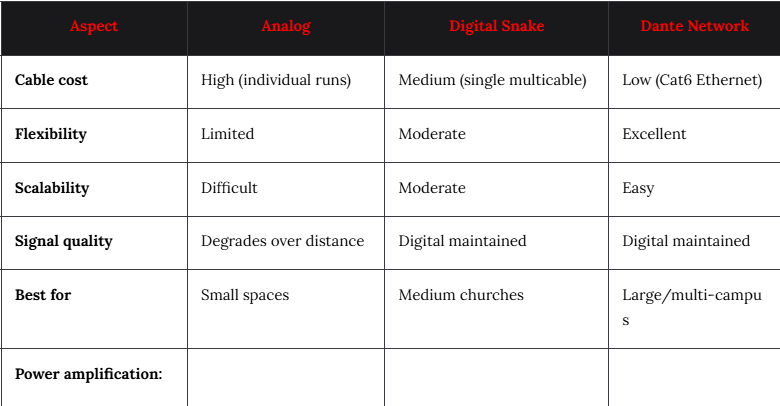
- Powered speakers: Amplification built into cabinets (common in modern systems)
- Passive speakers + rack amps: Traditional approach, centralized power
- Networked amplifiers: Dante-enabled for flexible installation
Best Video Display Solutions for Large Venues
Choosing Between LED and Projection
Decision factors:
Ambient light levels:
- High ambient light (skylights, windows, bright overhead): LED required (1,000+ nits)
- Medium ambient: LED preferred or high-lumen projection (15,000+ lumens)
- Controlled lighting: Either technology viable
Viewing distance:
- Close viewing (under 40 feet): Fine pixel pitch (2.5mm-4mm) or projection
- Medium (40-100 feet): 4mm-6mm LED or projection
- Far (100+ feet): 6mm-10mm LED or large projection
Budget considerations:
- LED upfront: $50,000-$500,000+ depending on size and pixel pitch
- Projection upfront: $10,000-$100,000 for projector, screen, installation
- LED operating cost: Minimal (electricity only)
- Projection operating cost: Lamp replacements $500-$3,000 every 2,000-4,000 hours
Screen Positioning and Sizing
Optimal placement:
Traditional sanctuary layout:
- Flanking screens: Left and right of center platform/altar
- Central screen: Behind altar area (when architecturally appropriate)
- Balcony screens: Addressing steep sightlines
Contemporary design:
- Wide center screen: Single large display
- Curved LED: Following architectural elements
- Confidence monitors: Stage-facing displays for worship team
Sizing guidelines:
- Screen height should be minimum 1/6 of distance to furthest viewer
- Example: 120-foot viewing distance requires 20-foot tall screen minimum
- Width: 16:9 aspect ratio standard (20-foot height = 35.5-foot width)
Content Management
Media playback systems:
Presentation software:
- ProPresenter: Industry standard for worship, lyric display
- MediaShout: Alternative with similar features
- PowerPoint/Keynote: Familiar but limited worship-specific features
Features required:
- Multiple outputs: Main screens, confidence monitors, streaming feed
- Lyric database: Searchable song library
- Bible integration: Quick scripture lookup and display
- Live video input: Camera feeds within presentation
- Social media display: Twitter feeds, announcements
- Scheduling: Plan services in advance
Microphone Selection Guide for Houses of Worship
Frequency Coordination
Wireless spectrum management:
Challenges:
- TV broadcast: Shares UHF spectrum with wireless mics
- Intermodulation: Multiple systems create interference
- Regulatory changes: FCC rules evolving (U.S. context)
Best practices:
- Professional frequency coordination for 8+ wireless systems
- Scan environment before deployment finding clear channels
- Wireless Workbench (Shure) or similar tools for coordination
- Digital systems: More efficient spectrum use than analog
Microphone Techniques
Proper gain structure:
Steps:
- Set preamp gain so peak signal reaches -12 dB on meter
- Adjust channel fader to achieve desired mix level
- Use master fader for overall volume control
- Avoid excessive gain causing feedback and distortion
Feedback elimination:
- Graphic EQ: Notch out problematic frequencies (use sparingly)
- Speaker placement: Keep speakers forward of microphones
- Microphone selection: Cardioid patterns reject rear sound
- Automatic feedback suppression: Available in digital consoles (use as backup, not primary solution)
Specialty Microphones
Boundary microphones:
- Altar/table mounting: Capturing readings and prayers
- Choir: Overhead boundary covering sections
- Piano: Inside lid for natural sound
Shotgun microphones:
- Long-distance pickup: Capturing processions and ceremonies
- Video production: Boom operation for interviews
- Special events: When wireless not practical
AV Equipment for Live Streaming Worship Services
Complete Streaming Setup
Essential components:
Video production:
- Cameras: 2-4 PTZ or fixed cameras
- Video switcher: Multi-input with transitions and graphics
- Lighting: Additional front light improving video quality
- Confidence monitor: For camera framing verification
Audio for streaming:
- Separate mix: Independent from house sound
- Compression: Tighter dynamics for broadcast
- EQ: Optimize for small speakers and headphones
- Delay: Sync audio with video (typically 60-120ms)
Streaming infrastructure:
- Encoding: Hardware or software converting to streaming protocols
- Internet bandwidth: Minimum 10 Mbps upload for HD, 25 Mbps for 4K
- Platform: YouTube, Facebook, Vimeo, church website, or dedicated (Subsplash, Pushpay)
- Backup connection: Secondary internet preventing outages
Audio Mixing for Broadcast
Differences from house mix:
House sound:
- Audience hears direct sound from stage + reinforcement
- Reverb: Minimal (room provides natural reverb)
- Dynamics: Wide range acceptable
- Bass: Full-range appropriate
Broadcast mix:
- Only amplified sound heard (no direct stage sound)
- Reverb: More generous creating space and warmth
- Compression: Heavier limiting for consistent levels
- Bass: Reduced low-end preventing distortion on small speakers
- Vocals: More prominent (audience can see if balance off, online cannot)
Workflow:
- Dedicated streaming engineer: Separate person managing online mix
- Auxiliary send: From main console to streaming mixer
- Monitor main mix: Use house mix as starting point, adjust for broadcast
Multi-Campus and Overflow Distribution
Video venue churches:
Technology requirements:
- Central production: High-quality recording of teaching pastor
- Dedicated fiber or high-bandwidth internet: Distributing HD video
- Local worship teams: Campus-specific music before video sermon
- Synchronized timing: Ensuring all campuses aligned
- Interactive elements: Campus-specific prayer and response times
Overflow rooms:
- Simple video distribution: HDMI over fiber or network streaming
- Audio reinforcement: Local speaker system
- Basic comfort: Seating, lighting, climate control
- Volunteer support: Greeters and hosts making attendees welcome
How to Design an AV System for a Large Worship Venue
Phased Implementation Strategy
Modular approach matching budget and growth:
Phase 1 - Essential (Year 1):
- Main speaker system: Professional line array or point-source
- Mixing console: Digital with scene recall
- Wireless microphones: 4-6 systems minimum
- Basic video: 1-2 displays for lyrics
- Presentation software: ProPresenter or equivalent
Budget: $75,000-$150,000 (500-1,000 seat venue)
Phase 2 - Enhanced (Years 2-3):
- In-ear monitor system
- Expanded video: Larger or additional screens
- Cameras: 2-3 PTZ for recording and streaming
- Basic streaming: Single-camera with audio feed
- Improved lighting: LED fixtures with basic control
Budget: $50,000-$100,000 additional
Phase 3 - Professional (Years 3-5):
- Multi-camera production: 4+ cameras with switcher
- Broadcast lighting: Three-point lighting, background lighting
- Advanced streaming: Multiple platforms, professional encoding
- Acoustic treatment: Panels, diffusers, bass traps
- Theatrical capabilities: Moving lights, haze, expanded control
Budget: $75,000-$200,000 additional
Infrastructure Planning
Future-proofing considerations:
Conduit installation:
- Empty conduit from control room to all potential equipment locations
- Oversized (2-3 inches) accommodating future cable additions
- Pull strings installed for ease of adding cables
- Documented paths with as-built drawings
Power distribution:
- Dedicated circuits for AV equipment (isolated from HVAC, lighting)
- Sufficient capacity: 20-30% overhead beyond calculated load
- Power sequencing: Controlled power-up preventing inrush damage
- UPS protection: For critical equipment preventing disruption
Network infrastructure:
- Fiber backbone: Between control room, stage, and video locations
- Cat6a structured cabling: Supporting future bandwidth needs
- Managed switches: VLAN support, QoS, monitoring capabilities
- Redundant paths: Preventing single points of failure
Volunteer Training Program
Ensuring operational success:
Training levels:
Level 1 - Basic Operation (All volunteers):
- System power on/off
- Scene recall for different service types
- Microphone on/off and volume adjustment
- Basic troubleshooting: Connection checks, reboots
Level 2 - Intermediate (Team leaders):
- Mixing fundamentals: EQ, compression, effects
- Video switching: Camera selection, transitions
- Custom scene creation: Saving new configurations
- Sound check procedures: Proper setup before services
Level 3 - Advanced (Technical directors):
- System architecture understanding
- Advanced troubleshooting: Signal flow analysis
- Equipment maintenance: Firmware updates, testing
- Vendor coordination: Working with integrators on issues
Training methods:
- Hands-on sessions: Practice during non-service times
- Video tutorials: Self-paced learning resources
- Documented procedures: Step-by-step guides at each position
- Mentorship: Pairing experienced with new volunteers
- Regular refreshers: Quarterly training maintaining skills
Common AV Challenges in Houses of Worship
Challenge 1: Acoustic Feedback and Poor Intelligibility
Problem: Reverberation and feedback plague many worship spaces
Causes:
- Hard surfaces (stone, tile, wood) creating long reverberation
- Poor acoustic design during construction
- Improper speaker placement directing sound at reflective surfaces
- Inadequate gain before feedback limiting volume
Solutions:
- Acoustic treatment: Strategically placed absorption and diffusion
- Speaker system upgrade: Modern line arrays with controlled directivity
- Microphone selection: Supercardioid patterns rejecting ambient sound
- Digital EQ and feedback suppression: Surgical notch filtering
- Professional acoustic consultation: Worth investment for severe cases
Challenge 2: Volunteer Technical Competency
Problem: Complex systems intimidating non-professional operators
Solutions:
- Simplified control interfaces: Hide complexity behind preset buttons
- Clear labeling: Plain language, not technical jargon
- Visual feedback: Color-coded status, confirmation messages
- Fail-safes: Default settings preventing damage or poor sound
- Remote support: IT staff or integrator can connect and assist
- Progressive disclosure: Advanced features hidden behind passcode
Challenge 3: Budget Constraints
Problem: Limited resources for comprehensive systems
Strategies:
- Prioritize intelligibility: Invest in acoustic treatment and speakers first
- Phased implementation: Deploy in stages as funds available
- Volunteer labor: Use congregation skills for non-technical installation
- Equipment donation: Gently used professional gear from upgrading churches
- Grant opportunities: Denominations and foundations offering technology funding
- Cost-benefit analysis: Show value of reaching online audience and members
Challenge 4: Architectural Restrictions
Problem: Historic or aesthetically sensitive spaces limiting equipment visibility
Solutions:
- Discreet speaker systems: Architectural integration, custom finishes
- In-wall installations: Speakers and displays built into millwork
- Wireless technology: Eliminating visible cable runs
- Hidden control rooms: Converting sacristy or side rooms
- Retractable systems: Displays that hide when not in use
- Preservation authority coordination: Working with historic commissions
Challenge 5: Multi-Use Facility Demands
Problem: Single space hosting worship, concerts, weddings, community events
Solutions:
- Flexible system design: Multiple input/output configurations
- Scene recall: Save complete settings for each event type
- Portable supplemental equipment: Additional speakers/mics for special events
- Comprehensive documentation: Settings for different users and uses
- Training diversity: Volunteers comfortable with various scenarios
Future Trends in Worship AV Technology
AI-Powered Production Tools
Automated camera direction:
- Facial recognition: Automatically framing active speakers
- Audio-based switching: Cameras following who's speaking
- Pre-programmed sequences: Smooth transitions between worship elements
- Multi-person framing: Group shots during congregational singing
Benefits:
- Reduced volunteer requirements: Single camera operator or full automation
- Consistent quality: Professional-looking production every service
- Lower training burden: Less technical expertise required
Available systems (2026):
- Panasonic AutoTrack cameras
- PTZOptics Move SE with AI tracking
- BirdDog Eyes with NDI and auto-framing
- vMix automation software triggering
Immersive Audio Formats
Spatial audio creating three-dimensional soundscapes:
Technologies:
- Dolby Atmos: Object-based audio with height channels
- L-Acoustics L-ISA: Immersive hyperreal sound
- Meyer Sound Spacemap: Spatial audio rendering
Applications:
- Contemporary worship: Enveloping congregations in music
- Theatrical productions: Directional sound effects
- Special services: Christmas, Easter immersive experiences
Requirements:
- Height speakers: Ceiling-mounted or elevated arrays
- Processing: Specialized audio processors
- Higher cost: Premium technology currently
- Trained operators: Understanding spatial mix concepts
Cloud-Based Collaboration
Multi-campus worship evolving:
Shared production resources:
- Central media server: All campuses accessing same content libraries
- Remote mixing: Audio engineers supporting multiple locations
- Distributed training: Online sessions for volunteer teams
- Analytics and reporting: Usage tracking across organization
Platforms:
- Planning Center Services: Multi-site service planning
- Renewed Vision PVP: ProPresenter cloud syncing
- Worship MIDI: Shared backing tracks and click tracks
Sustainable and Efficient Design
Green worship technology:
Energy efficiency:
- LED lighting: 80% reduction versus traditional theatrical fixtures
- Class D amplifiers: 90%+ efficient versus older Class A/B
- Power management: Automatic equipment shutdown
- Solar integration: Supplementing electrical load
Lifecycle management:
- Modular design: Replace components not entire systems
- Equipment reuse: Passing systems to smaller churches when upgrading
- Responsible disposal: E-waste recycling programs
- Extended warranties: Maximizing equipment lifespan
Enhanced Accessibility
Inclusive worship technology:
Real-time captioning:
- AI-powered transcription: Automatic closed captioning
- Multi-language translation: Serving diverse congregations
- Display options: Individual devices or shared screens
Advanced assistive listening:
- Bluetooth beacons: Direct audio to hearing aids
- Personal control: Individual volume and EQ adjustment
- Visual alerts: Flashing lights for deaf congregants
Sensory considerations:
- Autism-friendly settings: Adjustable lighting and sound levels
- Quiet rooms: Technology-enabled overflow for sensory-sensitive attendees
Frequently Asked Questions
Q: What is the typical budget for a complete worship AV system?
A: Small churches (under 300 seats): $50,000-$100,000. Medium churches (300-800 seats): $150,000-$300,000. Large churches (800-2,000 seats): $300,000-$750,000. Mega churches (2,000+ seats): $750,000-$3,000,000+. Includes audio, video, streaming, lighting, and control systems with professional installation.
Q: Should we prioritize audio or video in our worship space?
A: Audio absolutely takes priority. Poor sound makes worship impossible regardless of video quality. Allocate 50-60% of budget to professional audio systems and acoustic treatment. Video enhances but audio enables worship participation.
Q: How many wireless microphones do we need?
A: Minimum 4 systems (pastor, worship leader, 2 vocalists). Typical medium church needs 8-12 (adding musicians, guests, panel discussions). Large churches require 16-24+ for full bands, choirs, and multiple services with different teams.
Q: Can we use consumer equipment to save money?
A: Not recommended for primary systems. Consumer gear lacks reliability, remote management, and service support. Budget constraints better addressed through phased implementation of commercial equipment. Consumer acceptable only for practice spaces and temporary use.
Q: How do we maintain volunteer-friendly operation?
A: Invest in professional control systems with preset scenes. Create simple one-button operations for common tasks. Develop comprehensive training program with multiple skill levels. Document procedures with photos and videos at each mixing position.
Q: What internet speed is required for live streaming?
A: Minimum 10 Mbps upload for 1080p HD streaming (25 Mbps preferred for reliability). 4K streaming requires 25-50 Mbps upload. Use dedicated business internet with guaranteed upload speeds, not residential service with "up to" speeds. Implement backup connection preventing service disruption.
Q: How important is acoustic treatment compared to expensive speakers?
A: Acoustic treatment often delivers greater improvement than equipment upgrades. Untreated spaces with RT60 over 2.5 seconds waste investment in premium speakers through excessive reverberation. Budget $10,000-$50,000+ for acoustic panels, diffusion, and bass traps before upgrading existing functional equipment.
Conclusion
Designing and implementing effective audio visual equipment for houses of worship and large venues in 2026 requires balancing technical excellence, architectural sensitivity, budget reality, and volunteer usability. The importance of choosing the best audio visual equipment for these unique environments extends far beyond specifications—it directly impacts the ability to communicate spiritual messages, enable congregational participation, reach online audiences, and create meaningful worship experiences that serve the core mission of these sacred spaces.
For AV integrators and system designers serving religious institutions, success demands specialized knowledge: understanding the acoustic challenges of reverberant worship spaces, selecting speaker systems that deliver speech intelligibility while supporting live music, deploying video displays visible across long viewing distances and bright ambient light, creating streaming capabilities reaching global audiences, and designing control interfaces that non-professional volunteers can operate confidently.
The fundamental principles remain constant: audio quality determines worship effectiveness more than any other factor, acoustic treatment provides greater ROI than equipment upgrades in problematic spaces, standardization and simplicity maximize volunteer success, and phased implementation allows matching technology deployment to congregation growth and budget cycles. Emerging technologies—including AI-powered production tools, immersive audio formats, cloud collaboration platforms, and enhanced accessibility features—continue advancing worship technology capabilities throughout 2026.
Whether serving a small congregation installing their first professional sound system or designing a multi-campus mega-church with broadcast-quality production, the path to success requires collaboration between technical experts, worship leaders, and congregations, ensuring AV investments enhance rather than distract from worship experiences. By prioritizing intelligibility, respecting architectural character, planning for scalability, training volunteer teams comprehensively, and partnering with experienced integrators who understand worship environments, these sacred spaces can deploy audio visual equipment that faithfully serves their spiritual mission while embracing the technical capabilities enabling modern worship and outreach in our increasingly connected world.